EasyManua.ls Logo

NEC A3842 - Page 11

NEC A3842
40 pages
Print Icon
To Next Page IconTo Next Page
To Previous Page IconTo Previous Page
Loading...
8
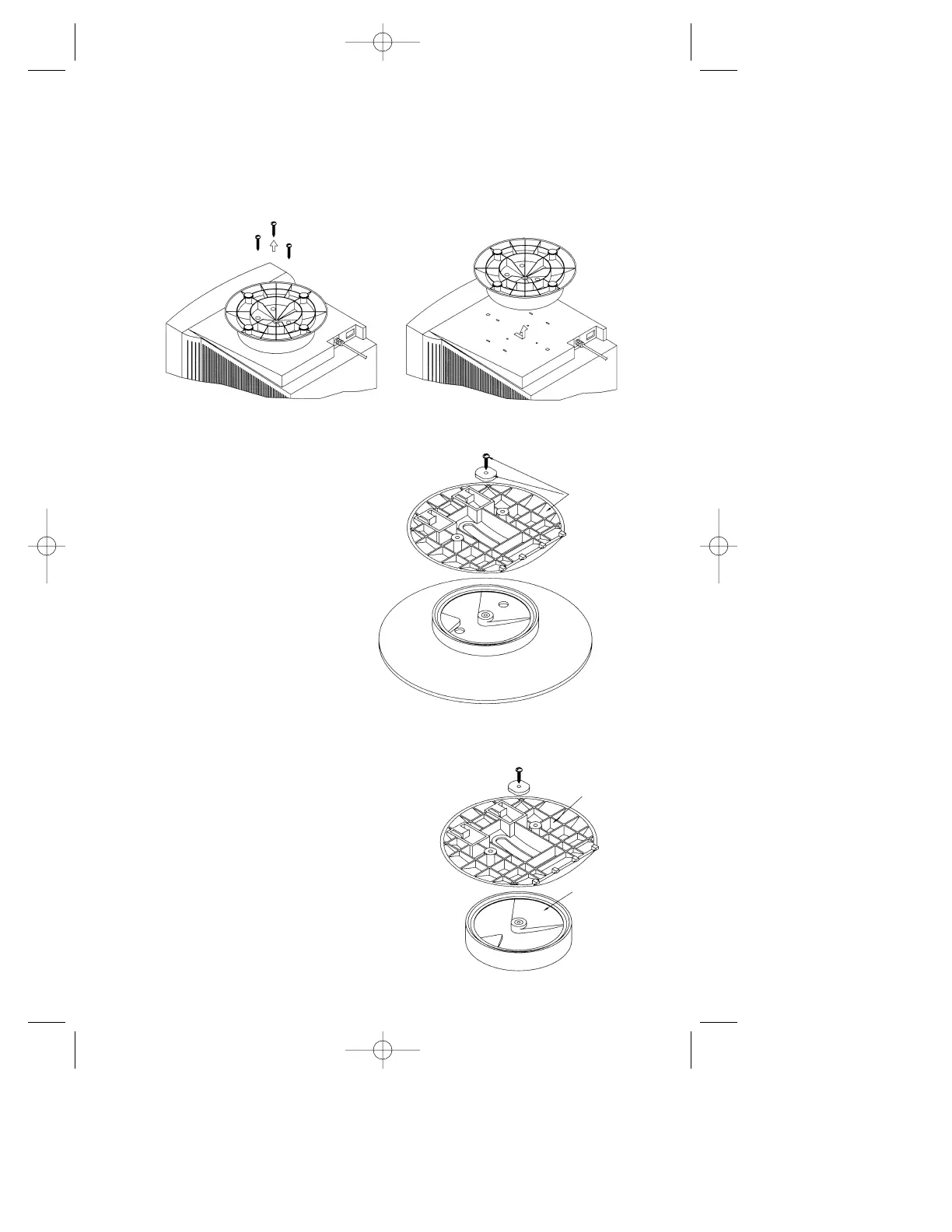
Step 2 Using a Phillips screwdriver, remove the three screws securing
the original base to the monitor. Remove the base by sliding and
lifting as shown in Figure 4A. Save these screws for use in
Step 5. Save the original base for possible future use.
Figure 4A
Step 3 Using a Phillips
screwdriver, remove
the screw securing
the two base
halves together
as shown in
Figure 4B.
Retain the screw
and black nylon
washer for
use in the next step.
Figure 4B
ORIGINAL MOUNTING
RETAIN
THESE
PARTS TO
USE IN
NEW
MOUNTING
Step 4 Locate Adapter Plate “B”
that is supplied with
the IntelliBase and secure
it to the spindle using the
screw and black nylon
washer that was removed
in Step 3 as shown in
Figure 4C.
BASE
ADAPTER
PLATE (B)
NEW MOUNTING
Figure 4C
NEC-ADA201 Eng/Fr. manual 9/8/98 12:26 PM Page 11

Related product manuals