3
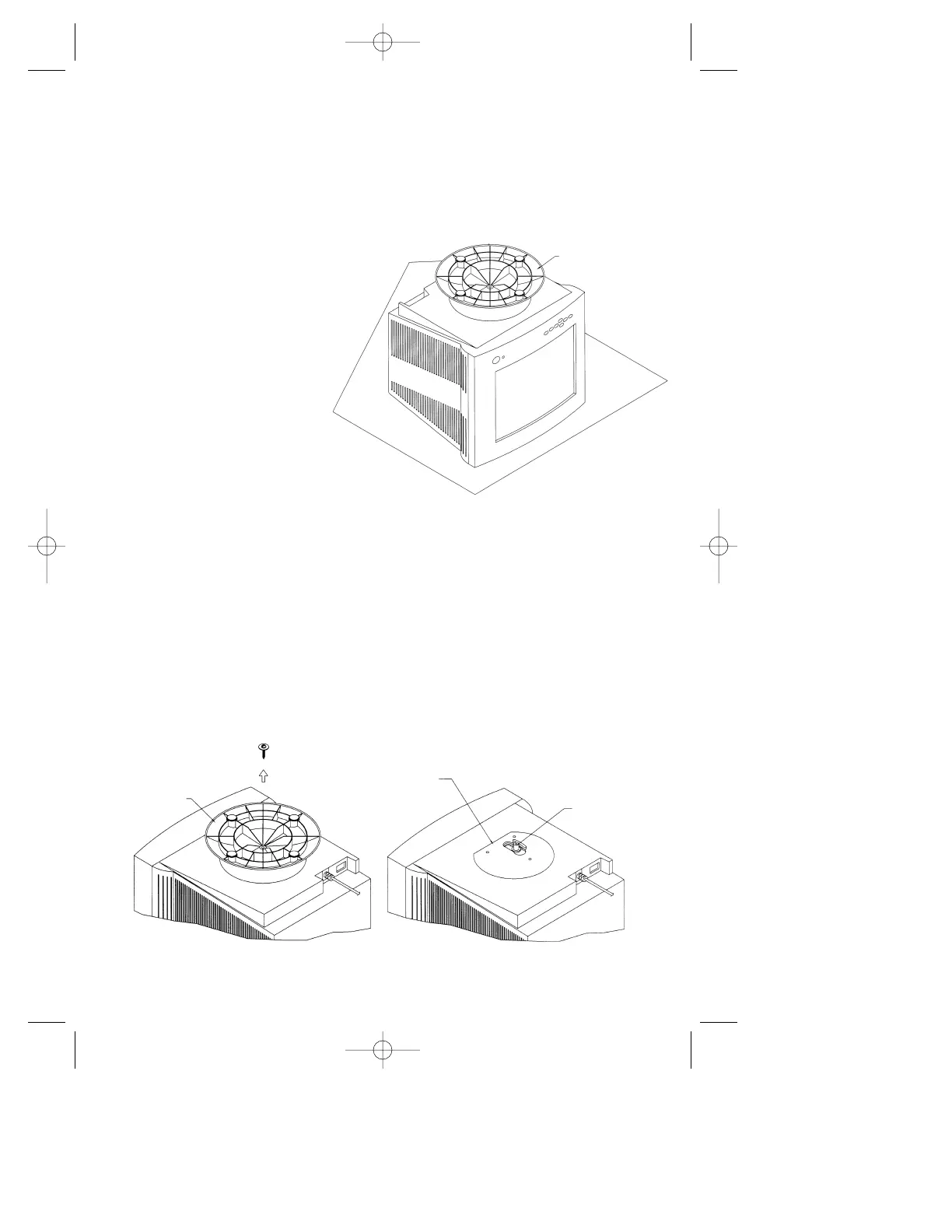
Step 2 Using a Phillips screwdriver, remove the screw securing the original
base to the monitor as shown in Figure 2A. Remove and save the
original base for possible future use.
Note: Do not remove the spindle or swivel plate.
Figure 2A
MultiSync Monitor Model Names
MultiSync 50, MultiSync 70, XV15 and XV15+
Step 1 With the monitor
unplugged from your
system and the wall
outlet, carefully turn the
monitor upside
down on a firm
table so that
the base is facing
up as shown
in Figure 1.
Figure 1
MONITOR IN POSITION TO
REMOVE THE BASE AND ATTACH
INTELLIBASE AUDIO
BASE
SWIVEL
PLATE
SPINDLE
DO NOT REMOVE SPINDLE OR
SWIVEL PLATE
BASE
NEC-ADA201 Eng/Fr. manual 9/8/98 12:26 PM Page 6










 To Next Page