7
Misting period 1 min - 11 h 59 min
Type of battery 4 x AA (not included)
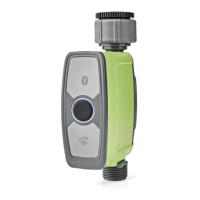
Main parts (image A)
1 Status indicator LED
2 Control button
3 Slot for battery
compartment
4 Battery compartment
5 Water lter
6 Water inlet
7 Water outlet
App overview (image B)
1 Last water usage
2 Battery status / Currently
active mode / Remaining
time until next irrigation
3 Manual mode
4 Parameter
5 Switch between Celsius
and Fahrenheit.
6 Adjust irrigation
schedules
7 Sensor
8 Details and instructions
Safety instructions
-
WARNING
• Ensure you have fully read and understood the instructions in
this document before you install or use the product. Keep the
packaging and this document for future reference.
• Only use the product as described in this document.
• Do not use the product if a part is damaged or defective.
Replace a damaged or defective product immediately.
• Close supervision is necessary when the product is used by or
near children, animals or inrm persons. Do not allow
children to play with it or touch it.
• Keep the product out of reach from children.
• Only use batteries that correspond with the specications.
• In the event of a leaking battery, do not allow the liquid to
come in contact with the skin or eyes. If contact has been
made, wash the aected area with copious amounts of water
and seek medical advice.
• Remove the battery before the product is scrapped.
• Properly dispose of the empty battery.
• This product may only be serviced by a qualied technician
for maintenance to reduce the risk of electric shock.
Installing the Nedis SmartLife app
1. Download the Nedis Smartlife app for Android or iOS on
your phone via Google Play or the Apple App Store.
2. Open the Nedis Smartlife app on your phone.
3. Create an account with your e-mail address and tap
Continue.
You will receive a verication code on your e-mail address.


 To Next Page