5
3. Plug the other end of the micro USB cable A
5
into a USB power adapter to
charge the product.
4
The charging indicator LED A
9
lights up red when charging.
4
The charging indicator LED A
9
stops lighting up when charging is
complete.
Pair with Bluetooth
1. Press the power button A
4
to switch on the product.
2. The status indicator LED A
7
lights up and the product emits a tone to
indicate pairing mode is active.
3. Activate Bluetooth on your audio source and connect with the product
(SPBT5000).
Playing audio from microSD card
1. Press the power button A
4
to switch on the product.
2. Insert the microSD card into the microSD card slot A
w
.
3. The tracks from the microSD card start playing automatically. Use the buttons
to control the audio.
Making phone calls
4
The built-in microphone enables you to make handsfree phonecalls.
4
When the speaker is connected to your phone via Bluetooth, phonecalls will
be automatically redirected to the speaker.
• Press A
1
to answer or nish a phone call.
• Hold A
1
to deny a phone call.
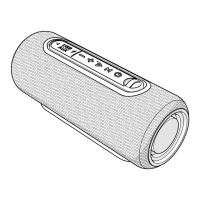
Button functions (Image A)
A1
Play / pause
button
Press to play or pause the music.
Hold to disconnect the Bluetooth.
Press to answer or nish a phone call.
Hold to deny a phone call.
A
2
Volume- button Press the button to decrease the volume.
Press and hold to skip to the previous track.
A
3
Volume+ button Press the button to increase the volume.
Press and hold to skip to the next track.
A
4
Power button Press and hold for 3 seconds to turn the product
on or o.


 To Next Page