ITALIANO
14
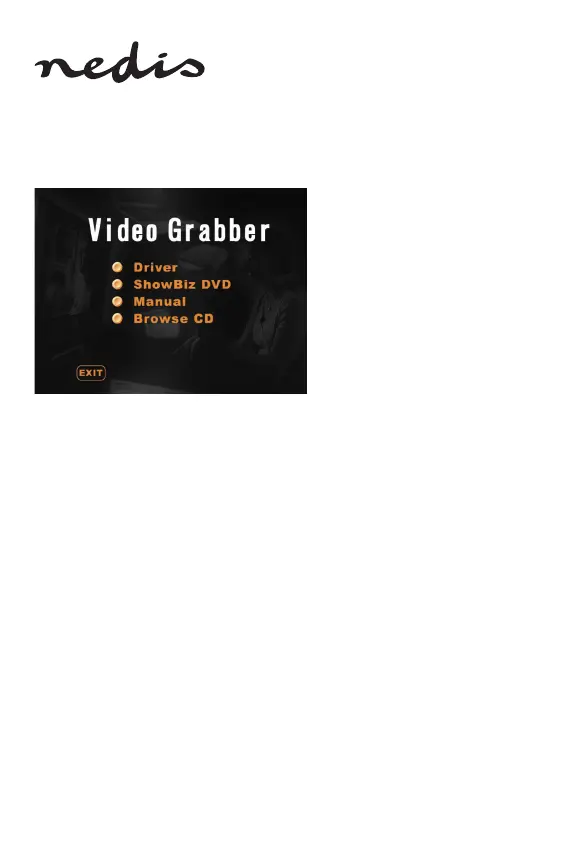
Installazione del software:
• Driver
• Software Arcsoft ShowBiz DVD
• Manuale (le della guida Arcsoft ShowBiz DVD)
1) Prima di utilizzare il digitalizzatore video, installare il driver e il software
seguendo le istruzioni sottostanti.
2) Fase 1: Inserire il CD nell’unità CD‑ROM.
3) Fase 2: Installare il driver facendo clic su “Driver installation”.
4) Fase 3: Riavviare il computer per accertarsi che il driver sia stato installato
correttamente.
5) Fase 4: Installare il software Arcsoft ShowBiz DVD.
6) Fase 5: Per l'uso del software Arcsoft ShowBiz DVD, consultare il manuale
contenuto nel CD. Fare clic su “Manual” e selezionare la lingua.
KONIG ELECTORNIC CSUSBVG100 MANUAL_A6_Print.indb 14 11-4-2018 11:14:42


 To Next Page