(2) Cleaning of print head and rubber rollers
When any of the following situations occur during
printing, the print head and rubber rollers should be
cleaned:
• Unclear printing;
• Loud noise during paper feeding or paper return;
• Debris stuck on the print head.
The steps for cleaning the print head and rubber rollers
areas follows:
O Power off the printer;
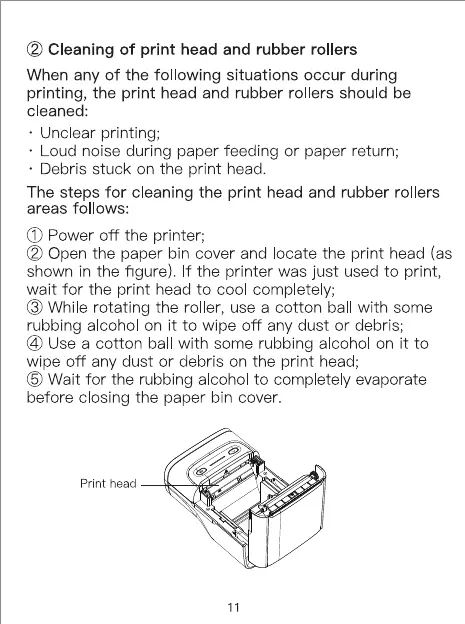
@ Open the paper bin cover and locate the print head (as
shown in the figure). If the printer was just used to print,
wait for the print head to cool comp etely;
O While rotating the roller, use a cotton ball with some
rubbing a cohol on it to wipe off any dust or debris;
@ Use a cotton ball with some rubbing a cohol on it to
wipe off any dust or debris on the print head;
G) Wait for the rubbing alcohol to completely evaporate
before closing the paper bin cover.
print head
11


 To Next Page