• Select
• Type
Install Printer Driver mtaner
Tt• instanatim corroleted successfu"y.
The installation was successful.
softwæe was nstüd.
Close
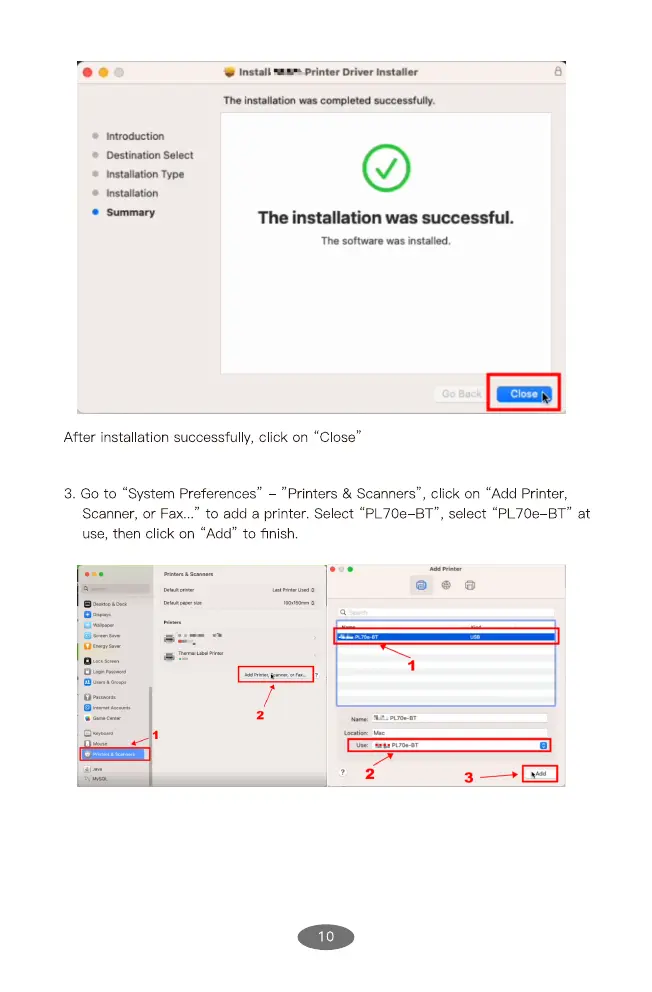
After installation successfully, click on "Close'
3. Go to "System Preferences" "Printers & Scanners", click on "Add Printer,
Scanner, or Fax..." to add a printer. Select "PL70e BT", select "PL70e BT"
use, then click on "Add" to finish.
PL'Owgt
at


 To Next Page