Mac Setup (USB)
Driver installation
1. Before installation, plug in and power on the printer. Connect it to your computer
via the IJSB cable.
Notes:
1. For computers that don't have a IJSB—Aport, use the included adapter instead
of a hub or docking station, which may prevent the computer from detecting the
printer.
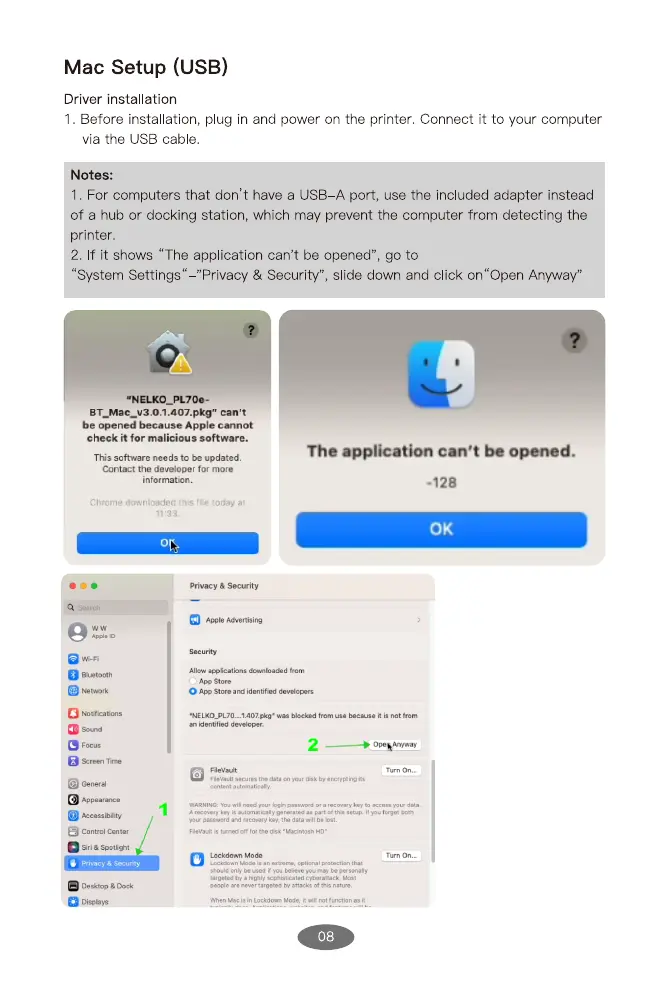
2. If it shows "The application can't be opened", go to
"System Settings"—"Privacy & Security", sl'de down and click on"Open Anyway"
•NELKO_PL70e-
can't
be opened because Apple cannot
check it for malicious software.
This software needs to be updated.
Contact the developer for more
in formation.
Chrome downloaded this filo today at
Privacy &
Apple
The application can't be opened.
-128
0K
Wi-Fi
æu•tOOth
Screen
General
Ecessibdit•y
O center
Siri sootli.ht
O St*e idmtified
•NELKO_PL70. . 407.
08


 To Next Page