Tips
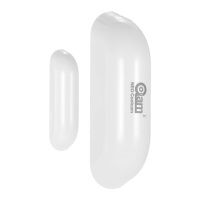
When the door is closed, and the distance between the main body and the deputy
is less than 2cm, the alarm gateway displays the door is closed perfectly.
When the door is opened, the distance between the main body and the deputy
body is more than 2cm, LED light flash and door sensor sends messages to the
alarm gateway, the alarm gateway displays the door is open and alarms.
Valid distance of door sensor is 2cm, so when install, please pay attention to the
trigger surface, it is triggered by point to point.
Make sure of that door sensor is in the alarm gateway’s network.
The status of LED
1. When the door sensor is triggered, LED light flashes red for 1 times.
2. When the door sensor installs battery, LED light will flash red for 5 times.
3. Quickly, triple click the code button ,add the door sensor to the Z-WAVE
network or delete door sensor from Z-WAVE network , LED light flashes red for
5 times.
4. Press on the code button for 10 seconds, the door sensor will be restored to
factory default settings, LED light flashes red for 1 time.
5. In the normal condition, the LED light keeps being out.
Associations
This has the effect that when the sensor is triggered, all devices associated with the
sensor will receive the relevant reports. Through an association the sensor may
control another Z-Wave network devices, e.g. the alarm device, wall plug, lamp etc.
The Door Sensor supports two linkage groups:
Linkage group 1 is assigned to the device status - sending the BASIC SET control
frame to the associated devices having detected motion.
Linkage group 2 reports relay's status to just one device, Z-Wave network's main
controller by default. It's not recommended to modify settings of this association
NOTE
Door Sensor linkage with other devices through Z-wave network directly, alarm
gateway or Z-wave controller does not take part in such communication.


 To Next Page