neo-tools.comneo-tools.com
6
4.5
125
105
30
35
40
0
1
.5
25
80
85
115
100
120
110
90
95
75
60
55
65
45
50
70
N.m
4
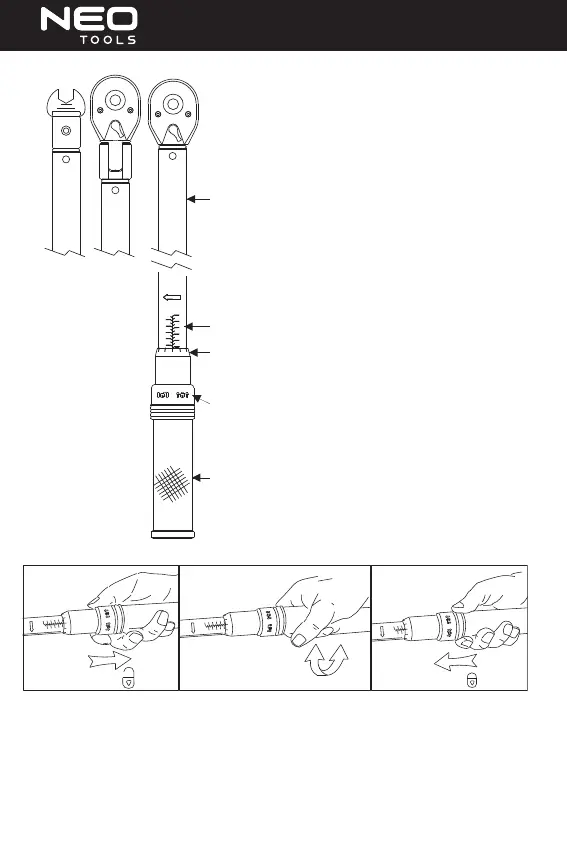
Torque wrench indicates when the preset torque has been reached by
releasing for a few degree of free travel, which is usually accompa nied by
an audible "click" signal.
Hardened alloy steel housing
EASY TO READ SCALES:
Major Torque Scale
Minor Torque Scale
(Convenient reference secondary units scale is located on back side)
Pull/push style lock knob secures selected torque from accidental change,
easy to lock and unlock
All-metal durable knurled grip
SETTING TORQUE
N.m
1
5.
0
4.5
4
95
90
70
45
65
85
55
80
60
75
50
40
35
125
120
115
110
105
100
30
25
Unlock
-
+
2
25
30
100
105
110
115
120
125
N.m
35
40
50
75
60
80
55
85
65
45
70
90
95
1
0
5.
4.5
4
setting torque
1
5.
0
4.5
105
120
115
N.m
125
95
1
10
100
90
85
80
75
4
Lock
1. Pull the lock knob out downside. The locking and unlocking directions are indicated by appropriate icons on the lock knob.
2. Turn the grip in the clockwise direction to increase the torque, and in the counterclockwise to decrease it.
3. The major scales show the amount of torque in both primary and secondary units. The minor scale shows ne increments
in primary units. See examples on the next page.
4. Push the lock knob back to lock the grip. The minor scale may move a small amount to either side of the centerline mark
without aecting the accuracy of your settings.


 To Next Page
 Loading...