2
A BOUT THE NEO 2
. . . . .
A
BOUT
THE
NEO 2
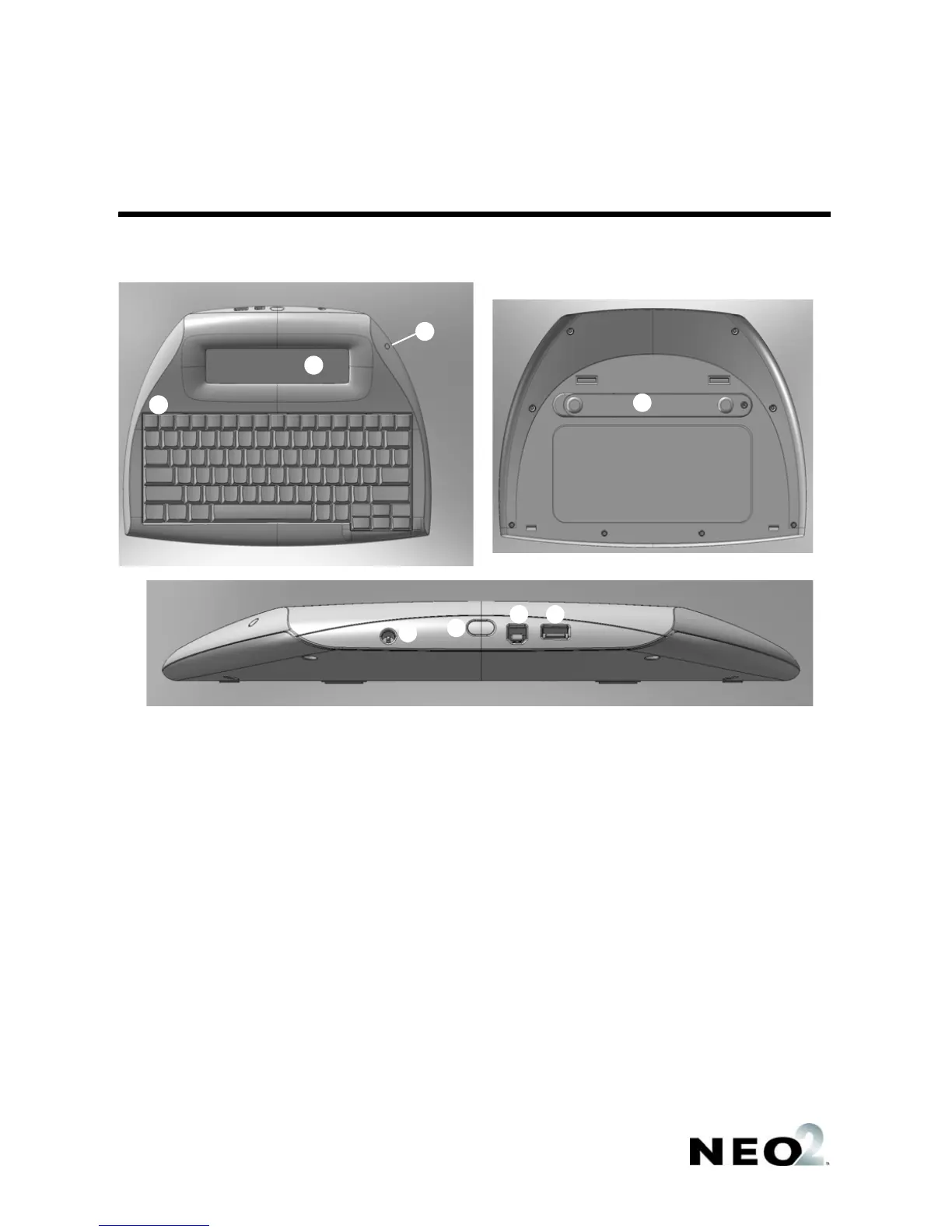
The drawings below will help you identify the parts of your NEO 2:
A
B
C
D
E
F
G
H
A The NEO 2 screen.
B The keyboard. The top row includes keys that
are unique to NEO, including on/off, the eight
file keys, spell check, find, clear file, home, end,
applets, and send.
C The green light is on when your NEO 2 is
connected to a computer, to a SmartOption
Cart, or to an AC Adapter. If your NEO 2 has a
rechargeable battery pack, a green light means
the batteries are charged; amber means they
are being charged.
D The battery compartment cover.
E The connection point for the AC adapter cord
(for NEOs with the rechargeable battery pack).
F The IR port for infrared beaming between NEOs
or between NEO 2 and a computer.
G The port for connecting NEO 2 to a computer
using a standard USB cable.
H A USB port for connecting NEO 2 directly to a
USB printer.


 To Next Page
 Loading...