6
C ONNECTING NEO 2 TO YOUR COMPUTER
Connecting a Single NEO 2 to Your Computer
. . . . .
9. The program will ask if you want to search for configuration files from
previous versions of AlphaSmart Manager.
• If this is the first time you’ve installed the program, click No.
• If you have a previous version and you want to save your
configuration, click Yes. If the program can’t find the files, you may
need to browse for them yourself.
10. The installer will also ask if you want to add the program to the dock. Click
Yes or No. The installation will be completed. Your computer may be
restarted.
C
ONNECTING
NEO 2
TO
Y
OUR
C
OMPUTER
Connecting a Single NEO 2 to Your Computer
1. If this is the first time you have connected your computer to NEO 2, make
sure you are logged in as an administrator or that you have permissions
that allow the device drivers to load properly.
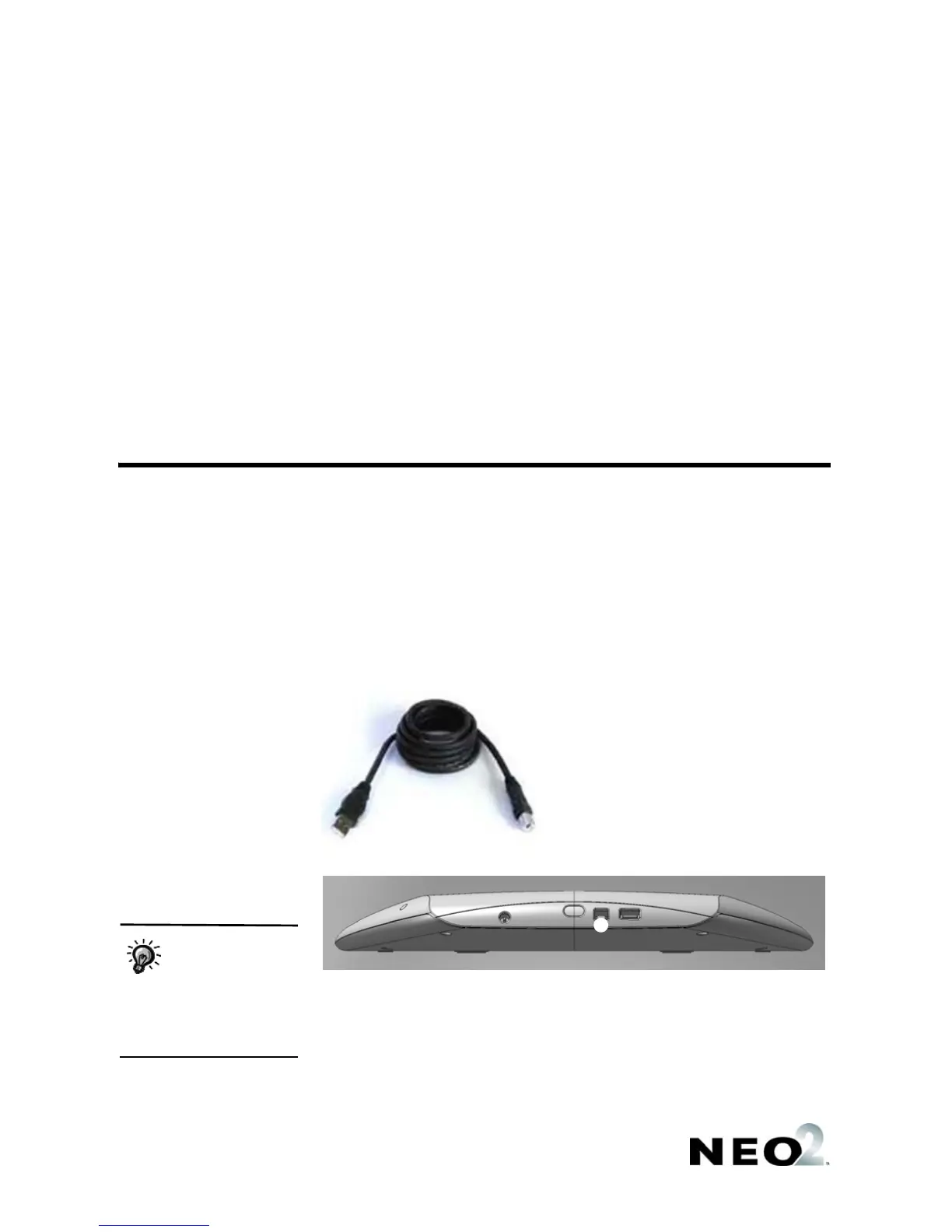
2. Using the cable that came with NEO 2, connect the USB connector
A to
your computer, and connect the square end
B to your NEO 2 at C.
3. The first time you connect your NEO 2 to a Windows computer, the
computer may notify you that it has found the hardware and installed the
driver. If a hardware wizard appears, follow the instructions in the wizard.
A
B
C
On Windows XP
computers, you may
be notified that the
driver is not certified for
Windows XP. The driver will
work for your system; to go on,
click Continue Anyway.


 To Next Page
 Loading...