Step 1: Replace the DCPM module
To replace the DCPM module in your system, you must remove the failed DCPM module from the system and
then replace it with a new DCPM module.
1. If you are not already grounded, properly ground yourself.
2. Remove the bezel on the front of the system and set it aside.
3. Locate the failed DCPM module in the front of the system by looking for the Attention LED on the module.
The LED will be steady amber if the module is faulty.
The DCPM module must be replaced in the chassis within five minutes of removal or the
associated controller will shut down.
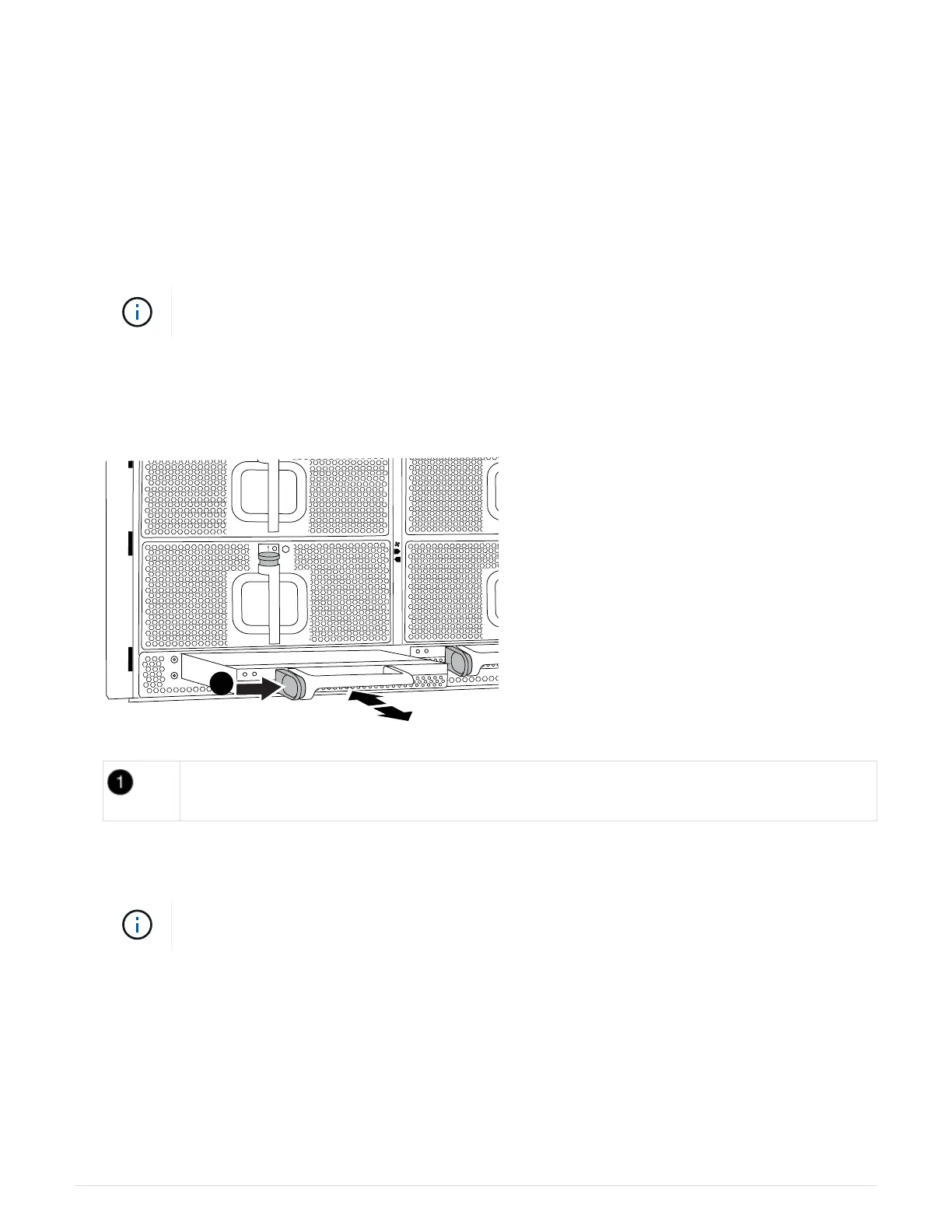
4. Press the terra cotta locking button on the module handle, and then slide the DCPM module out of the
chassis.
Animation—Remove/install DCPM
DCPM module terra cotta locking button
5. Align the end of the DCPM module with the chassis opening, and then gently slide it into the chassis until it
clicks into place.
The module and slot are keyed. Do not force the module into the opening. If the module
does not go in easily, realign the module and slide it into the chassis.
The Amber LED flashes four times upon insertion and the green LED also flashes if the battery is providing
a voltage. If it does not flash, it will likely need to be replaced.
Step 2: Dispose of batteries
You must dispose of batteries according to the local regulations regarding battery recycling or disposal. If you
cannot properly dispose of batteries, you must return the batteries to NetApp, as described in the RMA
instructions that are shipped with the kit.
84



 To Next Page