Step 3: Replace the NVDIMM
To replace the NVDIMM, you must locate it in the controller module using the FRU map
on top of the air duct or the FRU Map on the top of the slot 1 riser.
• The NVDIMM LED blinks while destaging contents when you halt the system. After the destage is
complete, the LED turns off.
• Although the contents of the NVDIMM is encrypted, it is a best practice to erase the contents of the
NVDIMM before replacing it. For more information, see the
Statement of Volatility on the NetApp Support
Site.
You must log into the NetApp Support Site to display the Statement of Volatility for your
system.
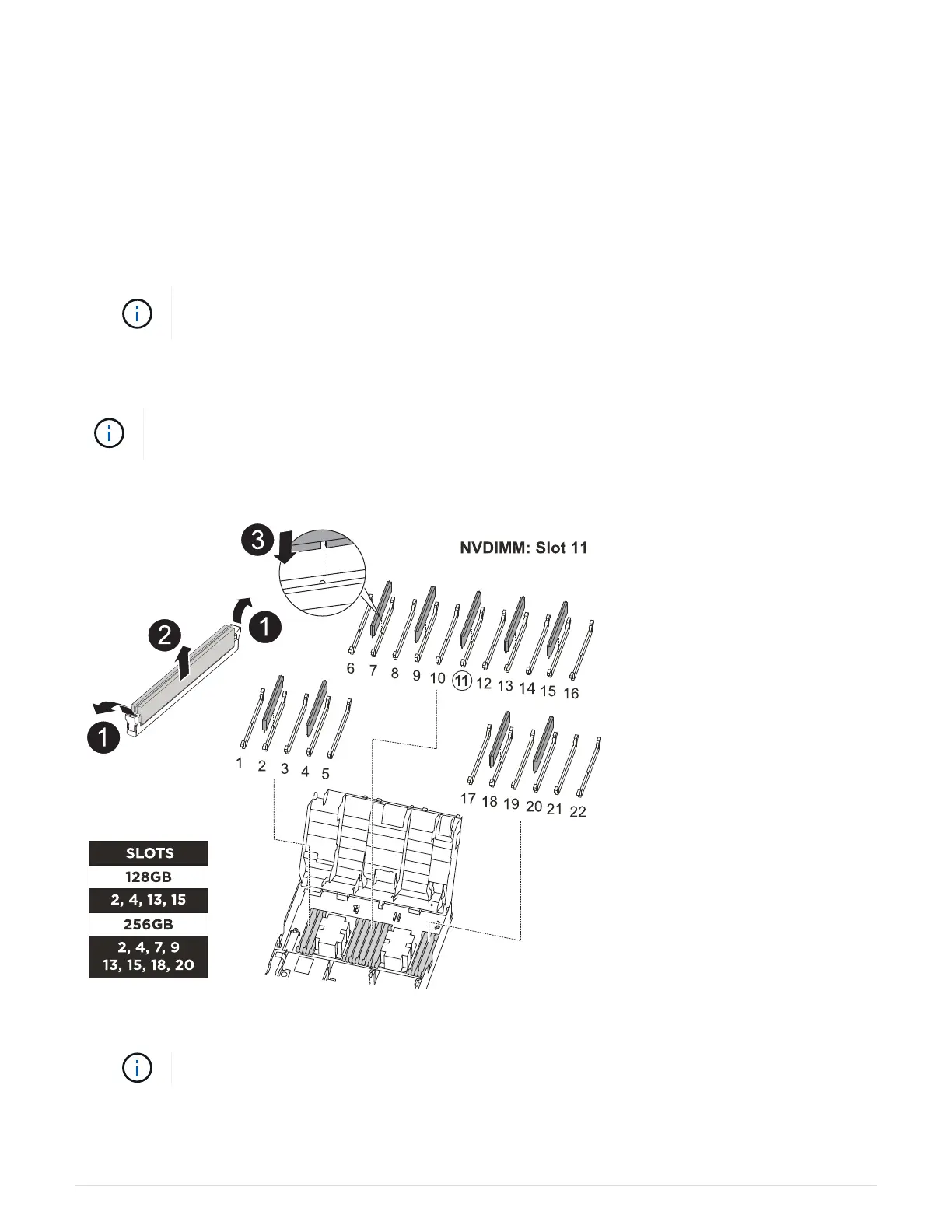
You can use the following animation, illustration, or the written steps to replace the NVDIMM.
The animation shows empty slots for sockets without DIMMs. These empty sockets are
populated with blanks.
Animation - Replace the NVDIMM
1. Open the air duct and then locate the NVDIMM in slot 11 on your controller module.
The NVDIMM looks significantly different than system DIMMs.
2. Eject the NVDIMM from its slot by slowly pushing apart the two NVDIMM ejector tabs on either side of the
NVDIMM, and then slide the NVDIMM out of the socket and set it aside.
85



 To Next Page