The Nevido PF120 is a Wi-Fi Automatic Pet Feeder designed to provide scheduled and manual feeding for pets, with smart features for convenience and monitoring.
Function Description
The primary function of the Nevido PF120 is to automatically dispense dry pet food at scheduled times, controlled via a Wi-Fi-connected app. It also supports manual dispensing and includes a voice recording feature to call pets at feeding times. The feeder is designed for indoor use and is suitable for dry food with kibble sizes ranging from 2-15mm (0.07-0.6 inches) in diameter. It features an alert indicator for low food or food getting stuck, and an ECO mode for battery-only operation to conserve power.
Important Technical Specifications
- Model: PF120
- Support Network Type: 2.4G Wi-Fi Network ONLY
- Food Tank Capacity: 4 liters
- Power: DC 5V power adapter; 3 x alkaline D batteries (Not Included) for backup
- Power Adapter Input: AC100-240V
- Power Adapter Output: DC 5V
- Power Consumption: 5W
- Use Time (battery mode): Up to 30 days when batteries are new
- Operating Temperature: 0°C - 55°C / 32°F - 131°F
- Dimensions: 170x345x339mm / 6.7x13.5x13.3 inches
- Net Weight: Around 1.6KG / 3.5lb
- FCC Compliance: Part 15 of FCC Rules, Class B digital device. RF Exposure guidelines require a minimum distance of 20cm between the radiator and the user's body.
Usage Features
The Nevido PF120 offers several user-friendly features:
- Wi-Fi Connectivity: Connects to a 2.4G Wi-Fi network for remote control via the "Smart Life" app. The Wi-Fi indicator shows connection status (flashing slowly for ready to connect, flashing rapidly for connection in progress, steady for connected and working).
- App Control: Users can download the "Smart Life" app from the APP store or Google Play, sign up/log in, and connect the feeder. The app allows for scheduling feeding times and adjusting portion sizes. Bluetooth on the mobile device should be turned on for connection. The feeder should be kept within 10 meters of the router.
- Manual Dispense: Food can be dispensed manually by pressing the unlock button (hold for 3s until the indicator turns on) and then the manual dispense button. The number of manually fed portions will be the same as the last manually set portion in the app. The feeder automatically locks after 1 minute.
- Voice Recording: A 10-second voice message can be recorded to call pets at feeding times. To record, press and hold the recording button for 3s in unlock mode until a double beep is heard, then release to start recording. Press the button once more to end recording (one beep confirms). The recording can be previewed by short pressing the record button.
- Food Tray Assembly: The food tray is inserted by tilting up the main unit and pressing down to secure it.
- Food Loading: The lid is lifted by pressing and holding the container button. A silica packet should be placed inside the lid to keep food fresh. Dry pet food is then added, and the lid is closed tightly. The dispensing unit auto-calibrates consistent portion sizes after initial use.
- ECO Mode: When operating on battery power only, the feeder disconnects Wi-Fi and turns off all white indicators to save power. It will automatically wake up and upload feeding records. Users can also manually press the unlock button to wake up the product.
- Reset Function: To reset the feeder, press and hold both the unlock and manual dispense buttons together until the Wi-Fi indicator blinks slowly. This is useful for re-configuration if connection fails.
Maintenance Features
Proper maintenance ensures the longevity and hygiene of the pet feeder:
- Cleaning Instructions:
- Unplug the unit from power.
- Rotate the food container counterclockwise and lift it up.
- Turn the food container over, rotate the funnel counterclockwise to extract it for cleaning.
- Battery Replacement: Use 3 new alkaline D batteries as backup power. Do not use rechargeable batteries. Ensure batteries are new before leaving the feeder for extended periods to ensure feeding during power outages.
- Power Cord Management: Store excessive power cord length in the battery compartment to prevent pets from biting it.
- General Care: Do not immerse the base part in water. Do not place foreign objects in the feeder. Do not use wet, canned, or moist food. Unplug the unit when not in use and before cleaning. Do not pull on the electrical power cord to remove the plug from the wall outlet.
- Troubleshooting: A dedicated section in the manual provides solutions for common issues such as Wi-Fi connection problems, food not dispensing, unresponsive buttons, and indicators being off. For further support, customers can contact Nevido-Service@outlook.com.

 Need help?
 General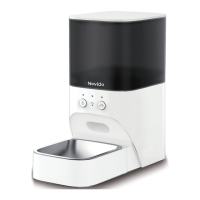

 To Next Page