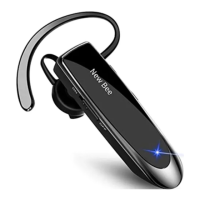
This document is a user guide for the LC-B41 wireless earphone.
Function Description
The LC-B41 is a simple, stylish business in-ear wireless earphone featuring a built-in CSR chipset. It is designed to provide high-definition calls and music, offering a long battery life of up to 24 hours to make daily life simple and convenient. The device supports two-device connection, allowing it to be paired with two smartphones simultaneously, though music playback is limited to one phone at a time. It also includes a Siri voice assistant wake-up function.
Important Technical Specifications
- Model: LC-B41
- Bluetooth Version: CSR V5.0
- Supported Profiles: Earphone, HFP (Hands-Free Profile), A2DP (Advanced Audio Distribution Profile), AVRCP (Audio/Video Remote Control Profile)
- Talking Time: Approximately 24 hours
- Standby Time: Approximately 60 days
- Charging Time: 2-3 hours for a full charge (first charge takes about 3 hours)
- Music Play Time: Approximately 20 hours
- Wireless Range: 10 meters
- Battery Type: Built-in lithium-ion polymer battery
- Charging Voltage: 5V
- Charging Current: 0.5A~2A
- Working Temperature: -10°C ~ 60°C
- Battery Status Display: Available on both iOS and Android devices
- Multi-point Support: Connects with 2 devices
Usage Features
The earphone features several keys for control:
- Power Key (No. 3): Push up to turn on, push down to turn off.
- Volume Key (No. 2):
- Short press "volume +" to increase volume.
- Press and hold "volume +" to skip to the next track.
- Short press "volume -" to decrease volume.
- Press and hold "volume -" to skip to the last track.
- To reset Bluetooth: While the red and blue indicators are flashing alternately, press and hold both "volume +" and "volume -" for 6 seconds.
- Telephone Answer/End Key (No. 4):
- When a call comes in, single press to answer.
- Long press to reject a call.
- While in a call, double press to hang up.
- While music is playing, single press for music play or pause.
- Double click to redial the last number in the address book.
- Long press to wake up Siri voice assistant.
Pairing Process:
- Turn on the earphone; the LED indicator will flash blue and red alternately, indicating it's in pairing mode.
- Turn on the Bluetooth function on your device (e.g., iPhone: Setting > Bluetooth > Activate; Android: Setting > Bluetooth > Search new devices).
- Search for "LC-B41" in the device's Bluetooth searching list.
- Connect to "LC-B41". Once connected, the LED indicator will turn off.
Two-Device Connection:
- Connect the LC-B41 with Phone A.
- Turn off the LC-B41 and the Bluetooth on Phone A.
- Restart the LC-B41 and pair it with Phone B.
- Turn on the Bluetooth on Phone A again and select "LC-B41" from the menu.
Note: While the earphone can connect to two phones, music can only be played from one phone at a time.
Call Management:
- Answering/Ending a Call: Short press the telephone answer/end key to answer; double click to hang up.
- Making/Taking a Call: When a call is made or taken, the sound will be automatically transmitted to the earphone.
- Rejecting a Call: While a call comes in, press and hold the telephone answer/end key.
Charging:
- The indicator turns red while charging and blue when fully charged.
- It is recommended to stop using the earphone while it is charging.
- Charge the earphone when you hear "battery low".
Maintenance Features
Troubleshooting Common Problems:
- Low battery causing disconnection: Charge the earphone in time.
- Earphone fails to turn on: Try charging it first, then attempt to turn it on again.
- No indicator while charging (after long disuse or battery runs out): The indicator might not show for a few minutes, but will turn red after some time.
- No sound in earphone:
- Ensure the earphone is turned on.
- Ensure the earphone is successfully connected to the phone.
- Ensure the earphone and phone are within 10m.
- Ensure "LC-B41" is selected in the searching list.
- Ensure the phone is within a strong enough signal range and without external interference.
- Check if the phone is connected to another Bluetooth device.
- Bluetooth earphone cannot be searched:
- Ensure the earphone is in pairing mode (LED flashes blue and red alternately).
- If there's a program error between the phone and Bluetooth, restart the device. To reset Bluetooth, press and hold both "volume +" and "volume -" for 6 seconds while the red and blue indicators are flashing alternately, or contact the manufacturer for repair.
- No sound while calling:
- Ensure LC-B41 is successfully connected to the phone.
- Check if the phone is connected to other Bluetooth devices.
Points for Attention:
- Avoid using non-original accessories, as this may lead to low performance, body damage, short circuits, and warranty failure.
- Do not disassemble the earphone, as this may damage it and void the warranty.
- Do not use the earphone in dusty environments.
- Use a clean, soft, and dry cloth to clean the earphone.
- Store the earphone in its original package when not in use.
- Keep the earphone away from children to prevent injury or damage.
- Avoid placing the earphone in hot or cold environments, as this may temporarily render it unusable.
- If the ear hook detaches, reattach it and continue use.

 Need help?

 To Next Page
 General