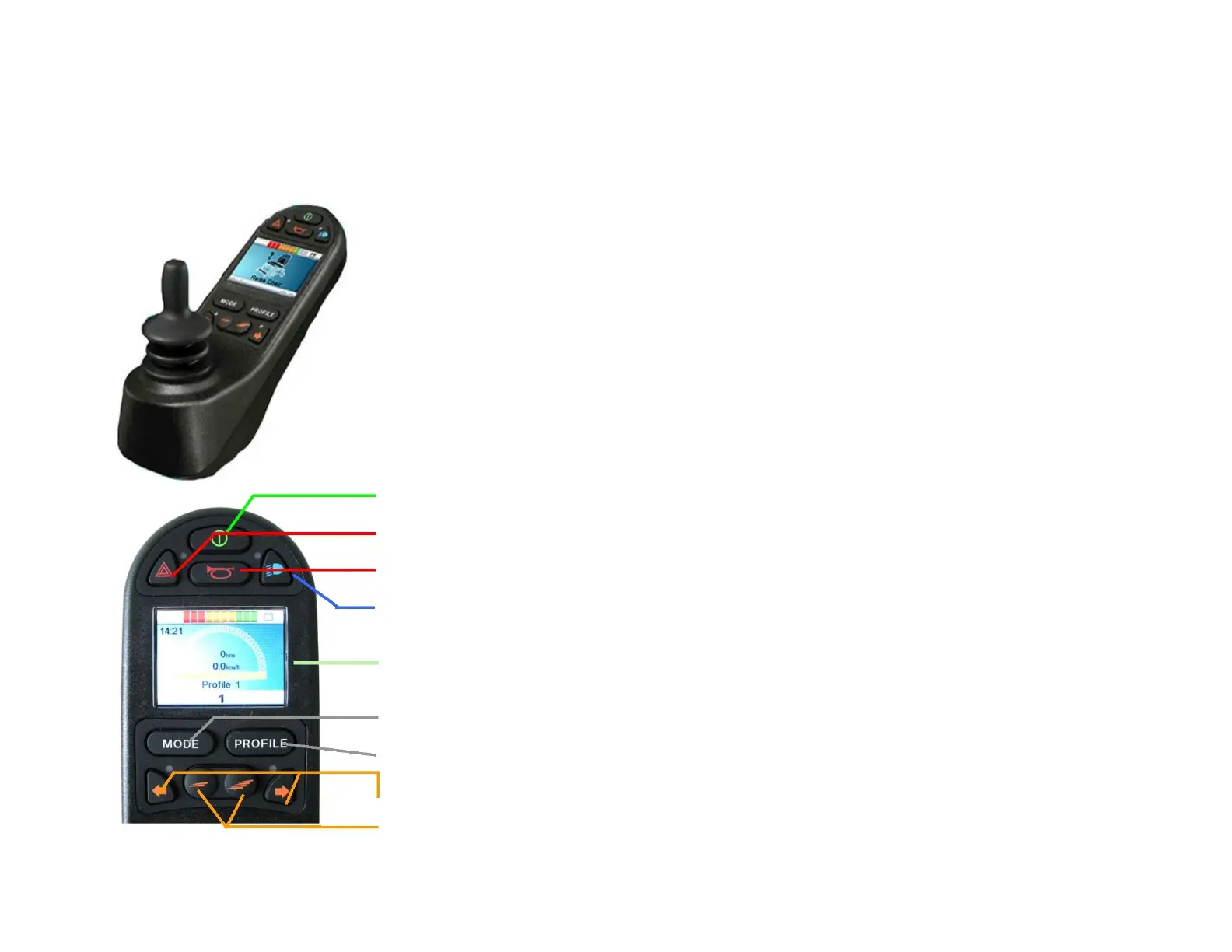
7.0 Control R-Net
The control R-Net is provided with a standard joystick. If it is turned ON it can direct the wheelchair in all
directions. The wheelchair always follows the direction which is given by the joystick. If you move the
joystick toward the front, the wheelchair will go forward. If it moves to the left, the wheelchair will turn to
the left. The same thing to the right and backward.
There are three driving programs which can be selected with the profile key. Each program can be
adjusted by the dealer so that it corresponds to the client. These programs can only be preprogrammed
by a specialist. If modification are needed, please contact the reseller (see first page for coordinates).
In case of failure an error code is indicated on the display. This points out where the error is located.
Immediately inform the dealer so that necessary mesures can be taken. Errors codes are listed in section
20.
On/off key
Warning
Horn Button
Lights
LCD Screen
MODE key (coming and going between driving and adjustments of the seat)
PROFILE Key (to select the driving program)
Left /Right turn signal
Keys for the speed adjustment - / +



 To Next Page