16
EN
BLUETOOTH
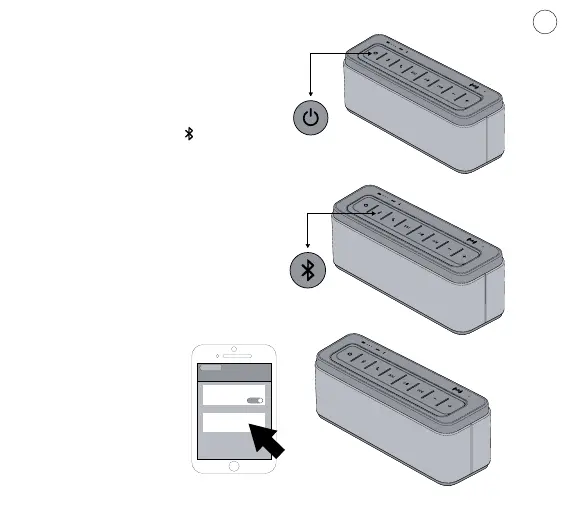
To pair and connect a Bluetooth device:
a) Long press Power for 2 seconds to turn
the speaker on.The status indicator is in
solid blue.
b) Press and hold the button “ ” for 2
second to enter the bluetooth pairing, the
status indicator is ashing in blue and red,
the speaker is ready to be paired.
c) Turn on Bluetooth on your device,
locate the Bluetooth device list, and select
the device named, “Soundmaster-L”.If your
device prompts you for a passcode, enter
“0000” (four zeroes).
When successfully paired with your device,
the status indicator on the speaker is
ashing in blue slowly.
Settings
Devices
BLUETOOTH
BLUETOOTH
ON
SOUNDmaster-L


 To Next Page