Storage:
Always store your unit in the provided
pouch when not in use to prevent
scratches to the front window.
Cleaning:
Rinse the window thoroughly with
water to remove grit before wiping or
polishing.
MAINTENANCE
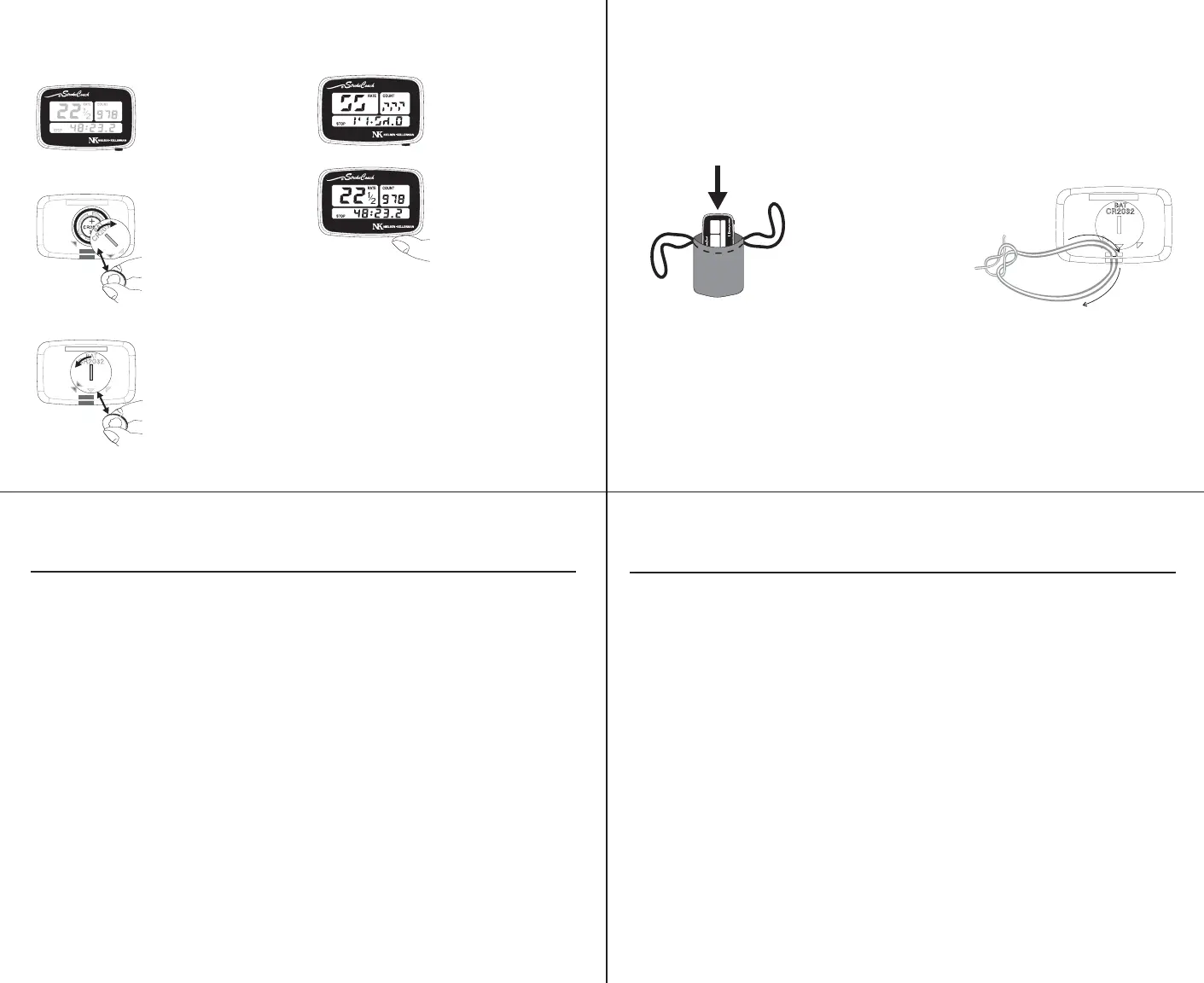
Carry Strap:
Install the carry strap provided by
threading it through the slot on
the bottom of the unit and tying.
6
Changing the Battery:
Resetting after Changing the Battery:
5
If the display appears
faint, you need to
replace the battery.
Flip the unit over and
open the battery
compartment with a
nickel or similar coin.
Tap the unit on your
hand to remove the
battery. Insert a new
3-Volt CR2032 lithium
watch battery, “+” pole
up, and replace the
battery door.
Make sure the black
o-ring seal is in place
before replacing the
door.
The display will
occsionally appear
scrambled after a
battery change.
Reset the unit by
holding the button
for two seconds
and the display
should return to
normal.
8
TROUBLESHOOTING
PROBLEM: POSSIBLE SOLUTION:
NO STROKE RATE The display unit may not be in contact with the
mounting bracket. Push the display unit firmly onto
the mounting bracket until a loud ‘click’ is heard.
The seat magnet may not be passing close enough to
the stroke rate sensor. Make sure that the magnet is
passing directly over the black sensor and within 3/4".
The magnet and stroke rate sensor may not be
correctly aligned. Make sure that the magnet and
black sensor are both across (perpendicular to) the
long axis of the boat.
If possible, swap your control unit with a control unit
you know works. If the stroke rate begins working,
your problem lies with your control unit. If the stroke
rate still does not work, your problem lies with your
mounting bracket, stroke rate sensor or magnet.
TIMER WILL The unit is in STOP or MEMORY mode. Hold the
NOT START button for two seconds to reset the unit and clear “STOP”.
The unit may not be receiving a “start” signal from the
stroke rate sensor. Review “no stroke rate” solutions above.
7
TROUBLESHOOTING, CONT.
PROBLEM: POSSIBLE SOLUTION:
Replace your battery (CR2032 Lithium watch battery),
following the instructions on page 10. In rare cases,
an electrostatic discharge (static electricity “shock”)
may cause your display’s unit to go blank. In dry
weather, a charge can build up while the unit is being
carried in the storage pouch or a pocket and be
discharged when the unit is touched or placed on
the mounting bracket. If this happens, you can
perform a complete reset of your unit as follows:
Open the battery door and remove the battery. Leave
the battery out for at least 10 seconds while pressing
and holding the button. Release the button and reinstall
the battery. The unit should turn on and function
normally when you push the button.
If this procedure does not solve the problem, and
your unit is more than 2 years old, try replacing the battery.
DISPLAY APPEARS FAINT,
DISPLAY SUDDENLY
GOES BLANK,
AND/OR
UNIT WILL NOT TURN ON


 To Previous Page
 Loading...