9
Parts of the Camera and Basic Operations
Basic Operations
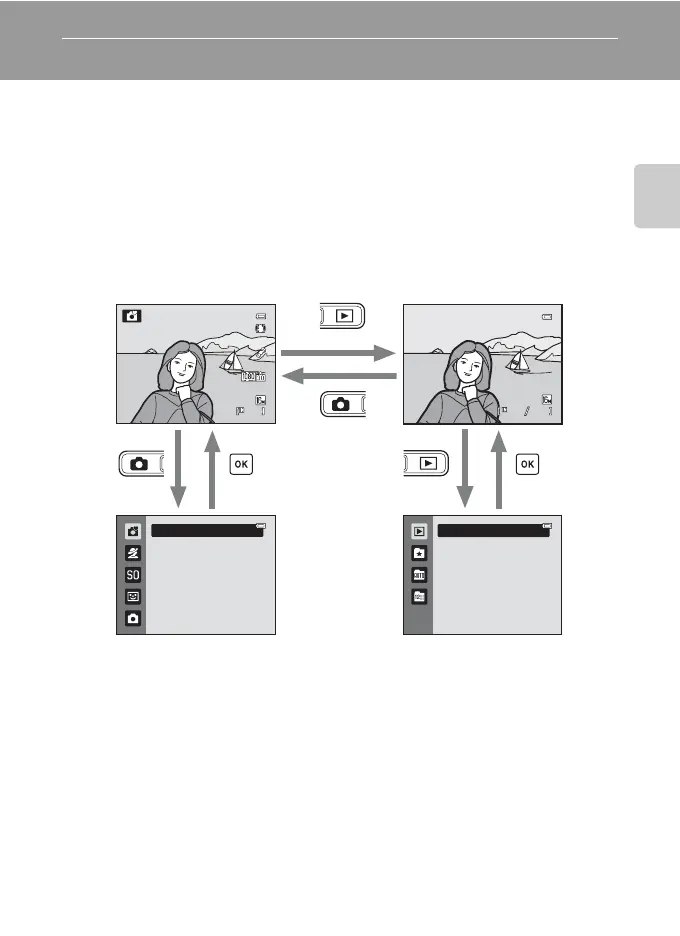
Switching Between Shooting Mode and Playback Mode
The camera has two modes of operation: Shooting mode, which is used for taking
pictures, and playback mode, which is used for viewing pictures.
Press the c (playback) button to switch to playback mode.
Press the A (shooting mode) button to switch to shooting mode.
• While using playback mode, you can also switch to shooting mode by pressing
the shutter-release button or the b (e movie-record) button.
• If you press the A (shooting mode) button while the shooting mode is
displayed, the shooting-mode selection menu is displayed, from which you can
select one of the available shooting modes (A26, 27).
• If you press the c (playback) button while the playback mode is displayed, the
playback-mode selection menu is displayed, from which you can select one of
the available playback modes (A70).
• Use the multi selector to select a shooting mode or playback mode (A10).
Shooting mode
Shooting-mode selection
menu
Playback-mode selection
menu
Playback mode
50s
2 1
2 1
Easy auto mode
4
ޓ4
0004.JPG
0004.JPG
15:30
15:30
15/11/2011
15/11/2011
Play



 To Next Page
 Loading...











