14
First Steps
First Steps
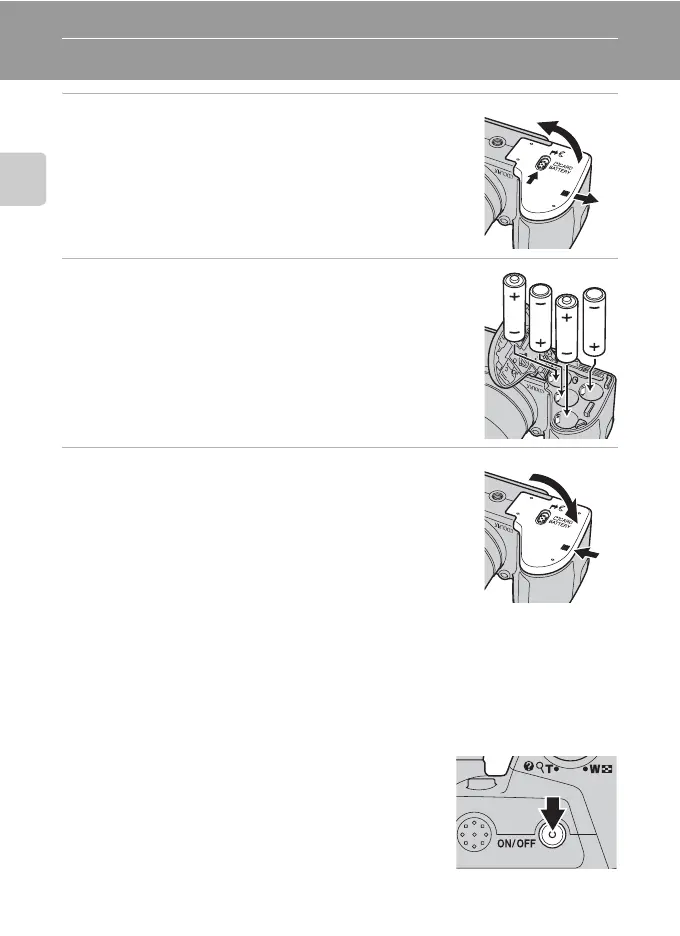
Inserting the Batteries
1 Open the battery-chamber/memory card slot
cover.
• Before opening the battery-chamber/memory card slot
cover, hold the camera upside down to prevent the
batteries from falling out.
2 Insert the Batteries
• Confirm that the positive (+) and negative (-) terminals are
oriented correctly as described on the label at the entrance
of the battery chamber, and insert the batteries.
3 Close the battery-chamber/memory card slot
cover.
Applicable Batteries
• Four FR6/L91 (AA-size) lithium batteries (batteries supplied)
• Four LR6/L40 (AA-size) alkaline batteries
• Four EN-MH2 rechargeable Ni-MH (nickel metal hydride) batteries
Turning On and Off the Camera
After removing the lens cap, press the power switch to
turn on the camera. The power-on lamp (green) lights for
a moment, then the monitor turns on. Press the power
switch again to turn the camera off. When the camera
turns off, both the power-on lamp and monitor turn off.
If the camera is turned off, hold down c to turn the
camera on in playback mode (A 26).
1
2
3
1



 To Next Page
 Loading...











