40
Selecting Scene Mode
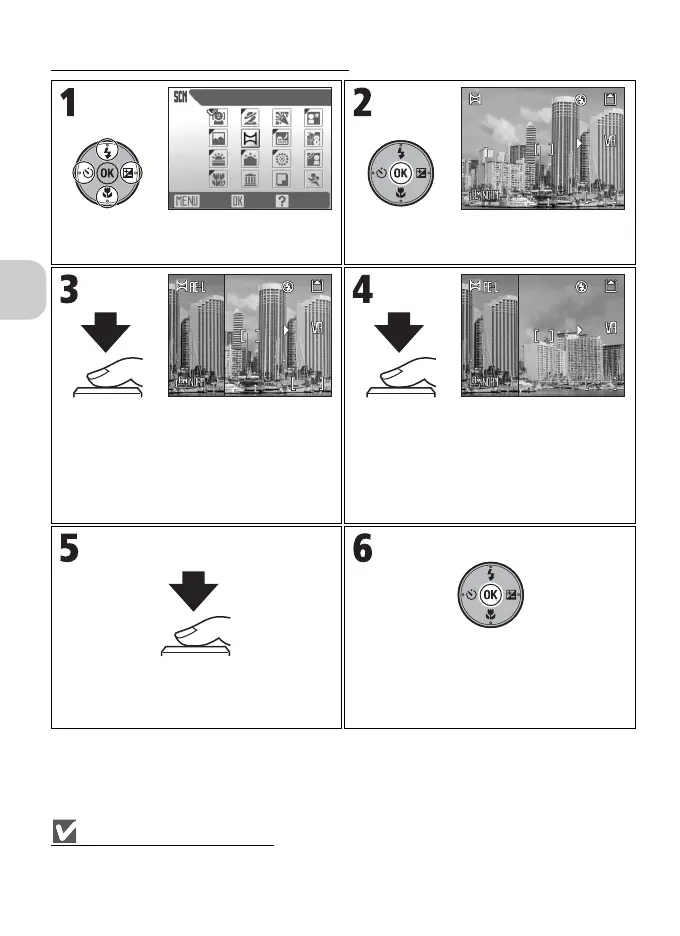
Using F PANORAMA ASSIST Mode
Note on Panorama Assist
Settings for the flash, self-timer, focus, exposure, and zoom position cannot be adjusted after the
first picture is taken.
Highlight F (PANORAMA ASSIST) in
Scene menu.
Compose first shot.
Take first shot.
•The G icon is displayed and approxi-
mately 1/3 of the picture is shown super-
imposed.
• Settings for white balance and exposure
are determined by the first shot.
Take next shot.
Compose the next shot to overlap with the
previous picture.
Take next shot.
Repeat steps 4 and 5 until all shots in the
series have been taken.
End series.
• Shooting will also end by changing the
mode or entering Standby mode.
PANORAMA ASSIST
OK HelpExit
F2.7
1/60
120
F2.71/60
120
F2.7
1/60
119
F2.71/60
119
F2.7
1/60
F2.71/60
119
119



 To Next Page
 Loading...










