65
The Movie Menu
Movies
Selecting Movie Options
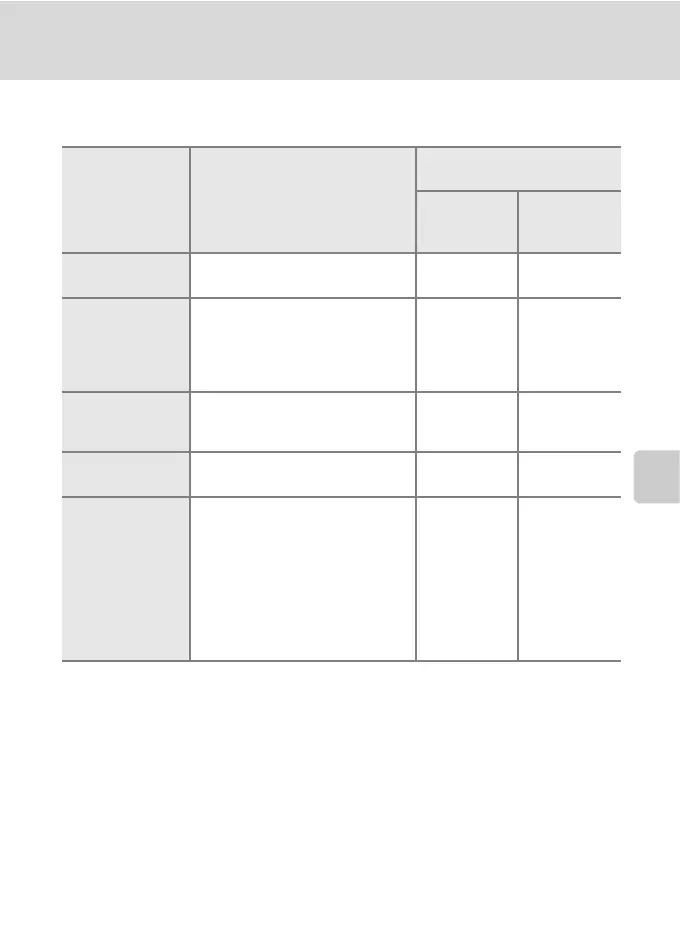
The movie menu offers the options shown below.
* All figures are approximate. Maximum movie length varies with make of memory
card. The maximum file size for movies is 2 GB. However, when recording to the
internal memory, or memory cards with capacities of less than 2 GB, the time
remaining display indicates the amount of free space remaining in the internal
memory or memory card. When 4-GB memory cards are used, up to 2-GB movies
can be recorded, and the time remaining display indicates the amount of time until
the maximum 2-GB file size will be recorded.
Option Image size and frame rate
Maximum movie length/
frames
*
Internal
memory
(approx.13 MB)
Memory
card
(256 MB)
Q
TV movie 640A
Image size: 640 × 480 pixels
Frame rate: 30 frames per second
8 sec. 2 min. 50 sec.
W
Pictmotion 640
Recording automatically stops
after 60 seconds. Suited for
Pictmotion movies (c 58).
Image size: 640 × 480 pixels
Frame rate: 10 frames per second
16 sec. 1 min.
u
Small size 320A
(default setting)
Image size: 320 × 240 pixels
Frame rate: 30 frames per second
22 sec. 7 min.
U
Smaller size 160
Image size: 160 × 120 pixels
Frame rate: 15 frames per second
2 min. 47 sec. 54 min.
E
Stop-motion
movie
Pictures can be taken and joined
into a silent movie (c 66).
Image size: 640 × 480 pixels
Frame rate for playback: choose
from five, ten, or 15 frames per
second
265, 260, or
255 frames
(when frame
rate for
playback is set
to [5 fps],
[10 fps], or
[15 fps]
respectively)
1,800 frames



 To Next Page
 Loading...








