71
Voice Recordings
Playing Voice Recordings
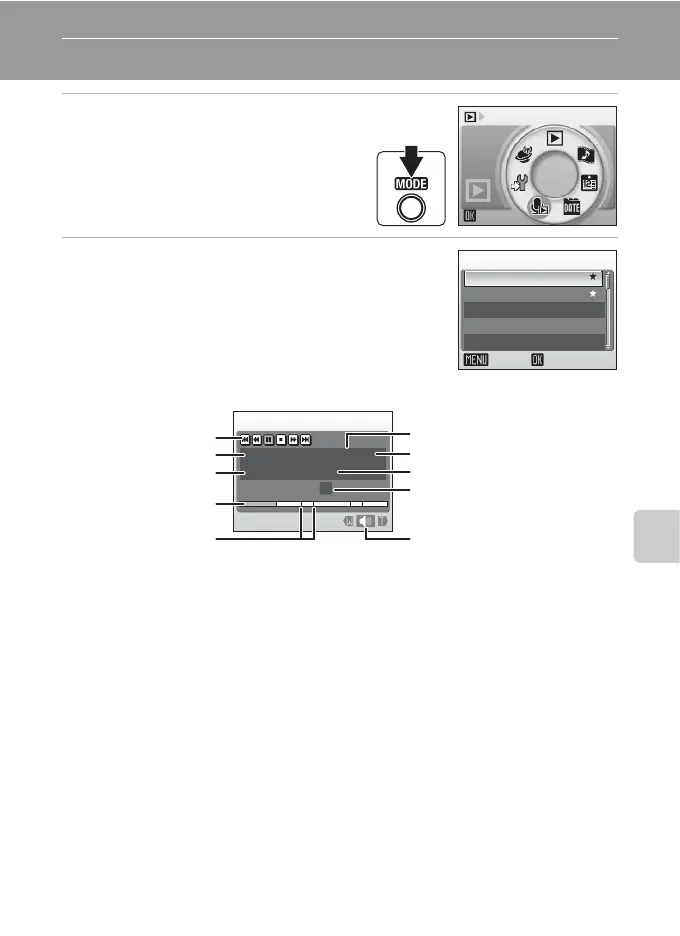
1 Enter audio playback mode by
pressing C in
playback mode
,
selecting q (use the rotary
multi selector), and then
pressing d.
2 Choose the desired file and press d.
The selected file will be played back.
Audio playback
q
003
004
002
001 15/11/2007 17:30
15/11/2007 18:30
26/11/2007 13:00
29/11/2007 16:40
03/12/2007 08:00
005
Select sound file
Copy Play
q
Index:
02
00:00:05/00:00:20
001
N
15/11/2007 17:30
Audio playback
Control icons
File number
Playback time
Index number
Progress indicator
Date and time of recording
Length of recording
VolumeIndex
Sound quality



 To Next Page
 Loading...








