109
Connecting to a Computer
Connecting to Televisions, Computers and Printers
Transferring Pictures from a Camera to a Computer
1 Start the computer to which Nikon Transfer was installed.
2 Be sure that the camera is off.
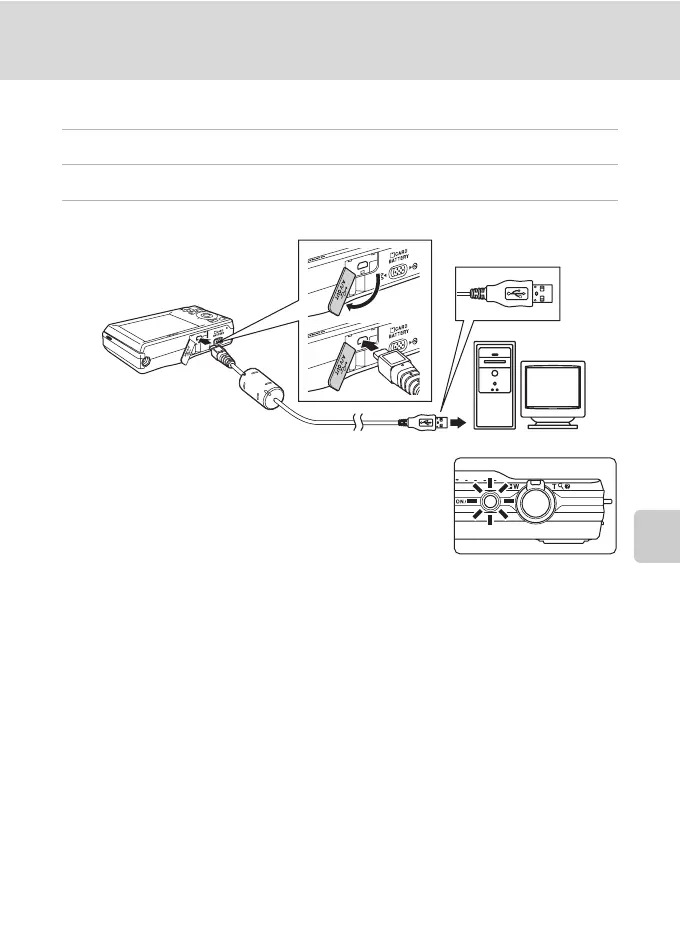
3 Connect the camera to the computer using the supplied USB cable.
The camera is automatically turned on and the power-on
lamp will light. The camera monitor will remain off.
B Connecting the USB Cable
• Be sure that connectors are properly oriented. Do not attempt to insert connectors at an angle,
and do not use force when connecting or disconnecting the USB cable.
• The connection may not be recognized if the camera is connected to the computer via a USB hub.



 To Next Page
 Loading...











