49
Shooting Options: Shooting Menu (A (Auto) Mode)
More on Shooting
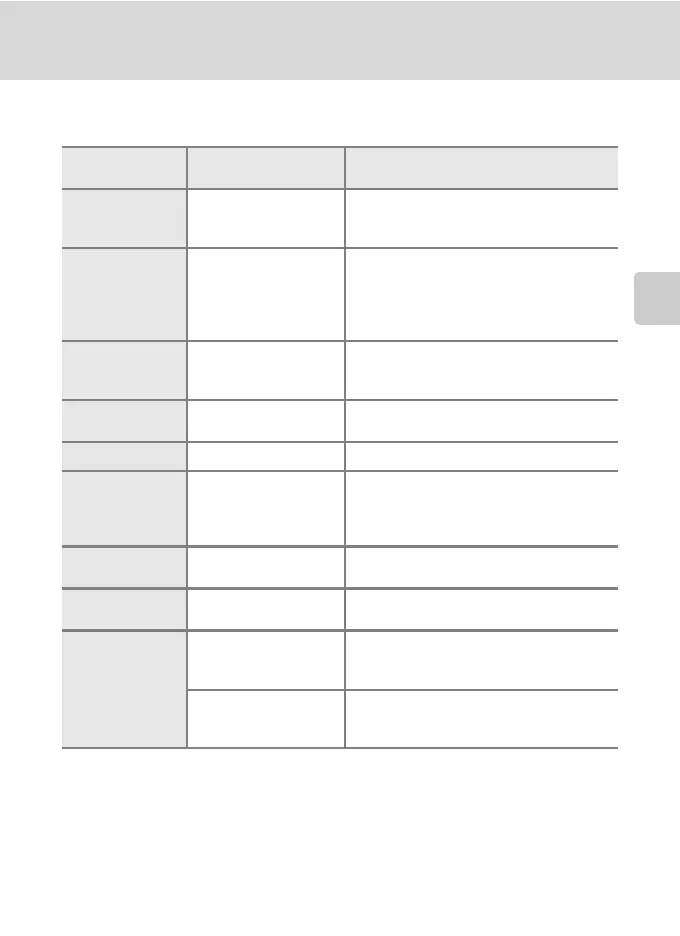
Camera Settings that Cannot Be Applied Simultaneously
Some shooting settings cannot be used with other functions.
Restricted
function
Setting Descriptions
Flash mode Continuous (A 42)
When Continuous, BSS, Multi-shot 16, or
Sport continuous is selected, flash is
disabled.
Image mode Continuous (A 42)
When Multi-shot 16 is selected, the
Image mode setting is fixed at L (image
size: 2560 × 1920 pixels). When Sport
continuous is selected, the Image mode
setting is fixed at M 2048 × 1536.
White balance Color options (A 44)
When using Black-and-white, Sepia, or
Cyanotype, the White balance setting is
fixed at Auto.
Metering Digital zoom (A 131)
When the digital zoom is in effect,
Metering is fixed at Center-weighted.
Continuous Self-timer (A 32) Fixed at Single when using self-timer.
ISO sensitivity Continuous (A 42)
When Multi-shot 16 or Sport continuous
is selected, the ISO sensitivity setting is
automatically specified according to the
brightness.
AF area mode Digital zoom (A 131)
When the digital zoom is in effect, the
camera focuses at the center of the frame.
Autofocus mode AF area mode (A 45)
When using Face priority, Autofocus
mode is fixed at Single AF.
Motion detection
Continuous (A 42)
When Multi-shot 16 or Sport continuous
is selected, Motion detection is not
enabled.
ISO sensitivity (A 43)
When the sensitivity is locked at the
specified value, Motion detection is
disabled.



 To Next Page
 Loading...











