EasyManua.ls Logo

Nikon D3300 - Page 28

Nikon D3300
541 pages
Print Icon
To Next Page IconTo Next Page
To Previous Page IconTo Previous Page
Loading...
10
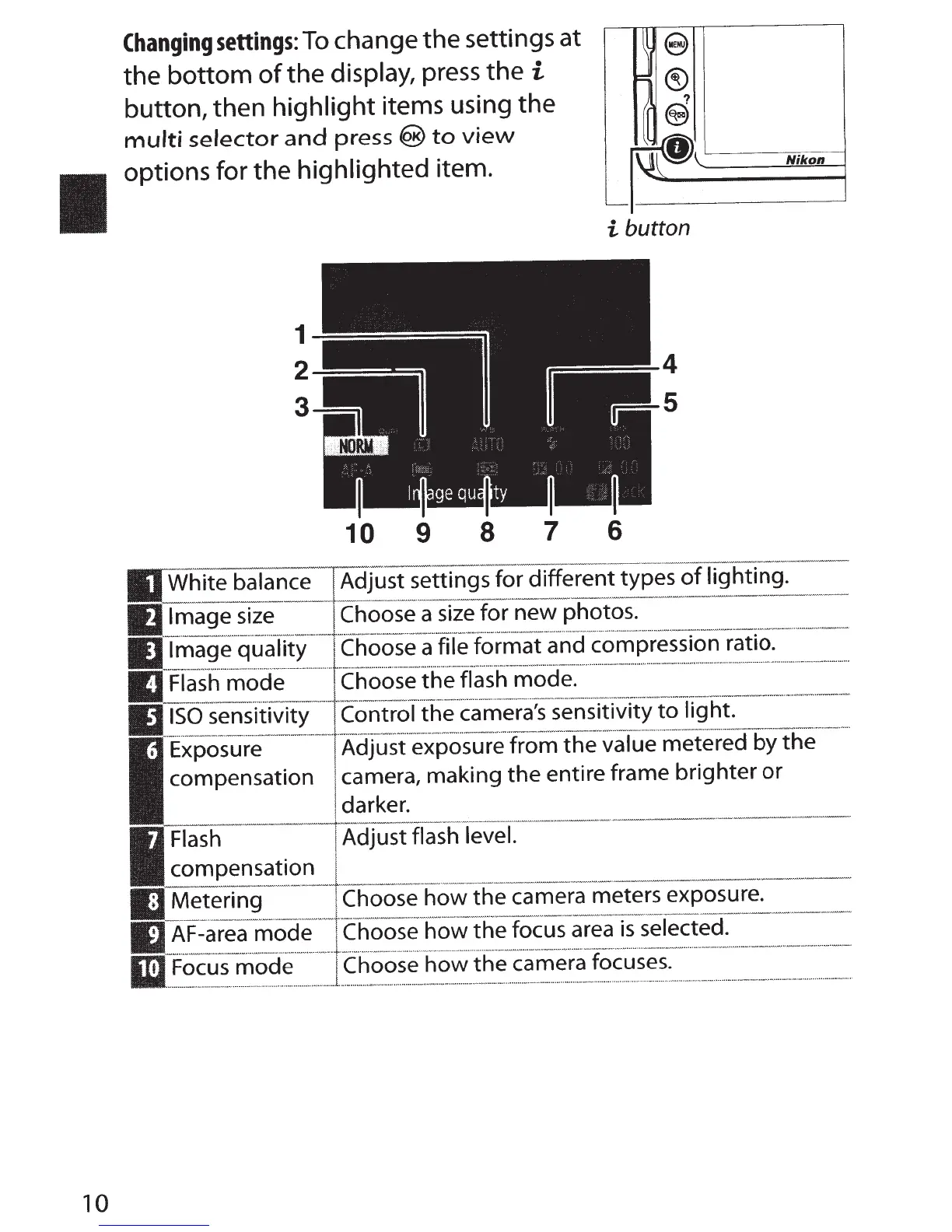
Changing
settings:
To
change the settings at
the
bottom
of
the
display,
press the
i
button, then
highlight
items using the
multi
selector
and
press
®
to
view
options for the highlighted item.
10
9
8
7
~
9
=
®
?
II@
II\
~,
i
button
6
White balance
Adjust settings for different types
of
lighting.
Image size
Choose
a
size
for new photos.
Image
quality
Choose
a file format and compression ratio.
Flash
mode
Choose
the
flash mode.
ISO
sensitivity
Control
the
camera's sensitivity
to
light.
Nikon
Exposure
compensation
Adjust exposure
from
the
value metered by
the
camera, making
the
entire frame brighter
or
darker.
Flash
compensation
Metering
AF-area
mode
Focus
mode
Adjust flash
level.
Choose
how
the
camera meters exposure.
Choose
how
the
focus area
is
selected.
Choose
how
the
camera focuses.

Table of Contents

Other manuals for Nikon D3300

Related product manuals