EasyManua.ls Logo

Nikon D3300 - Page 32

Nikon D3300
541 pages
Print Icon
To Next Page IconTo Next Page
To Previous Page IconTo Previous Page
Loading...
14
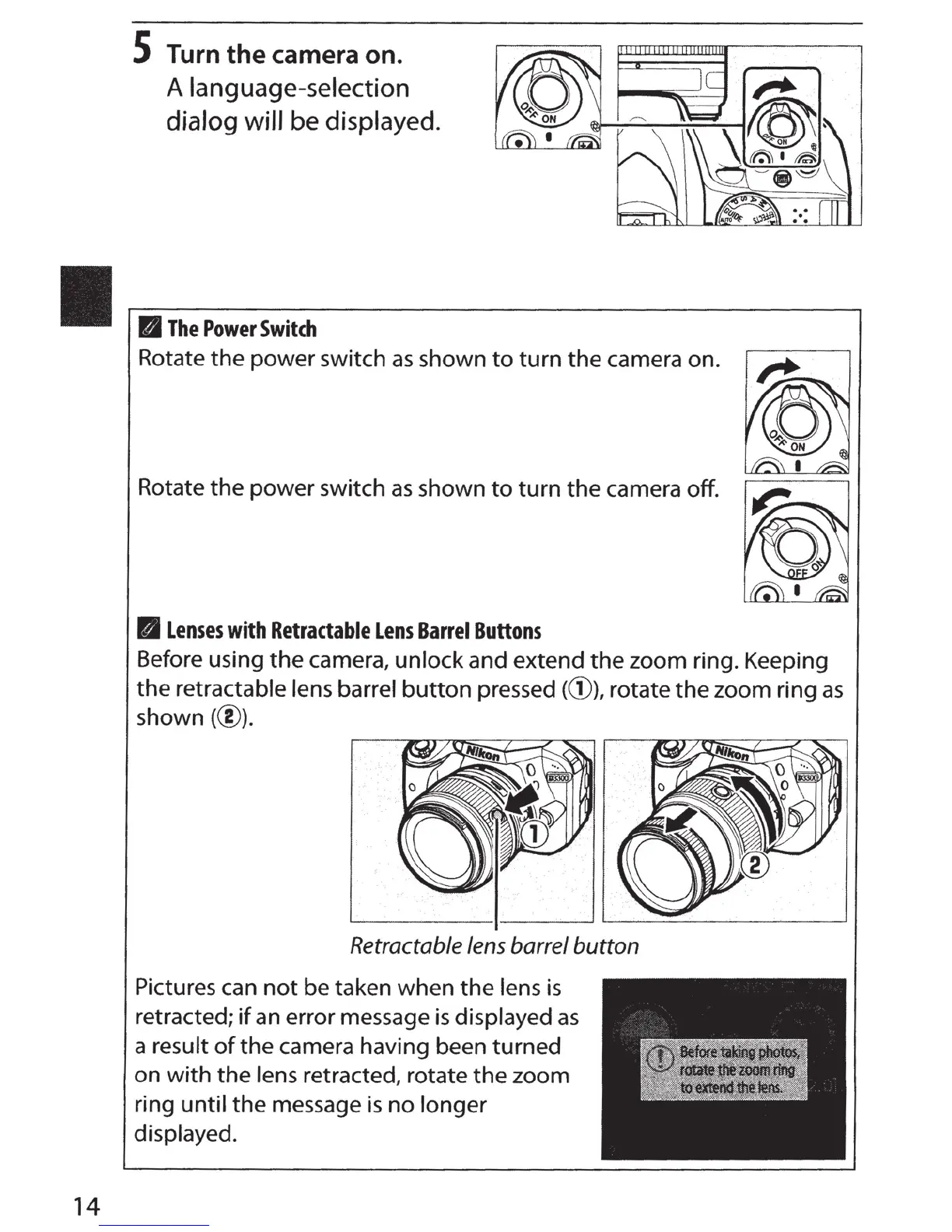
S Turn
the
camera
on.
A language-selection
dialog will
be
displayed.
II
The
Power
Switch
Rotate
the
power switch
as
shown
to
turn
the
camera on.
Rotate
the
power switch
as
shown
to
turn
the
camera
off
.
B
Lenses
with
Retractable
Lens
Barrel
Buttons
Before using
the
camera, unlock and extend
the
zoom ring. Keeping
the
retractable lens barrel
button
pressed (G)), rotate
the
zoom ring
as
shown(@).
Retractable
lens
barrel
button
Pictures can
not
be
taken when
the
lens
is
retracted;
if
an
error message
is
displayed
as
a result
of
the camera having been turned
on
with
the
lens retracted, rotate
the
zoom
ring
until
the message
is
no
longer
displayed.

Table of Contents

Other manuals for Nikon D3300

Related product manuals