EasyManua.ls Logo

Nikon D3300 - Page 41

Nikon D3300
541 pages
Print Icon
To Next Page IconTo Next Page
To Previous Page IconTo Previous Page
Loading...
~
raming Photos in
the
Viewfinder
'
1
Ready
the
camera.
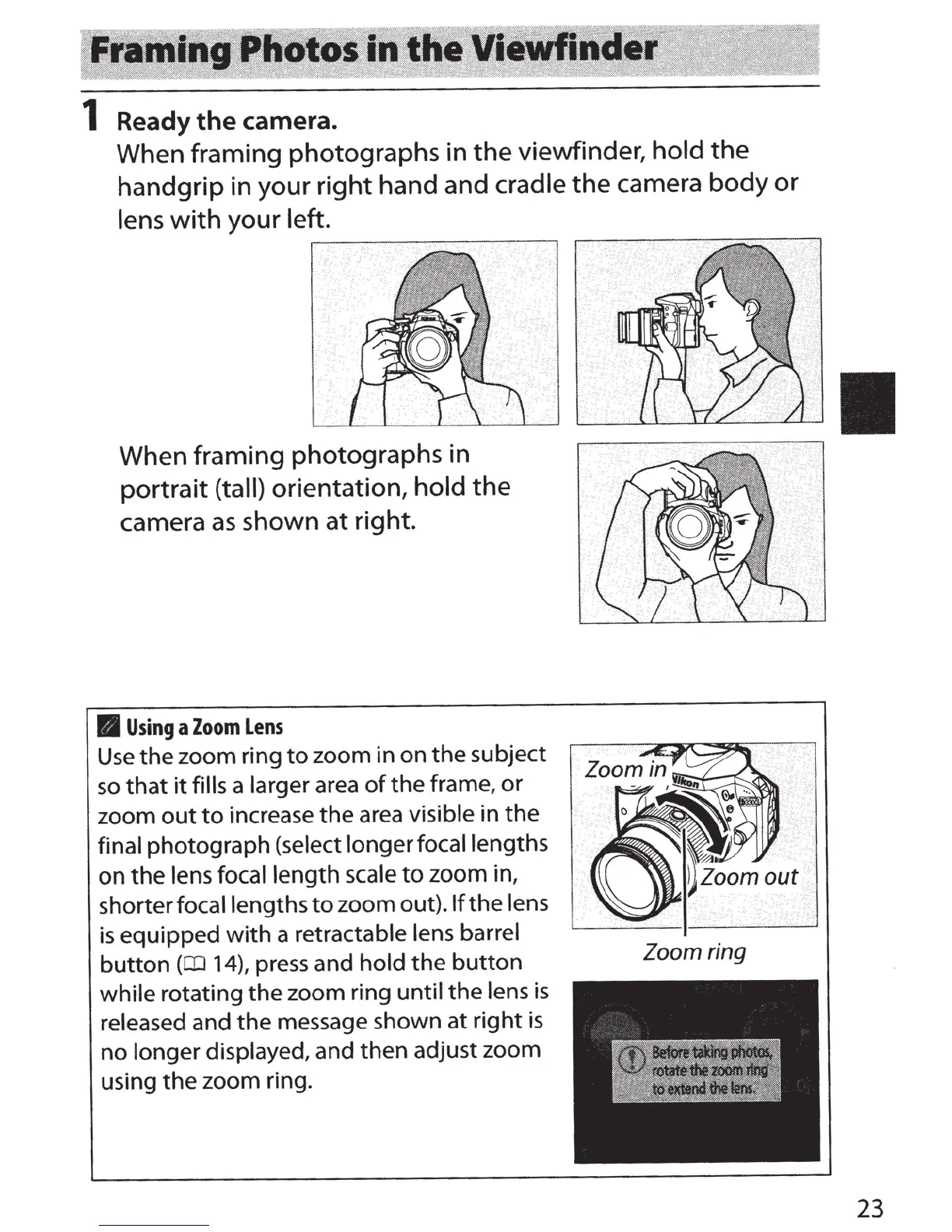
When framing photographs
in
the
viewfinder, hold
the
handgrip in your
right
hand and cradle
the
camera
body
or
lens
with
your
left
.
When framing photographs in
portrait
(tall) orientation,
hold
the
camera
as
shown
at
right
.
B
Using
a
Zoom
Lens
Use
the
zoom ring
to
zoom in
on
the
subje
ct
so
that
it
fills a
larger
area
of
the
frame,
or
z
oom
out
to
increase
the
area
visible
in
the
final photograph (select longerfocallengths
on
the
lens focal length scale
to
zoom in,
shorter
focal lengths
to
z
oom
out
)
.lfthe
lens
is
equipped
with
a
retractable lens barrel
button
(Cil
14),
press and
hold
the
button
wh
ile
rotating
the
zoom ring
until
the
lens is
released
and
the
m
es
sag
e shown
at
right
is
no
longer
di
splayed, and then adjust zoom
using
the
z
oom
ring.
Zoom ring
23

Table of Contents

Other manuals for Nikon D3300

Related product manuals