From time to time the Question
Mark icon on the shooting informa-
tion screen will flash. Press the Help
button to receive some advice on
how to fix the problem (such as
“Subject is too dark”).
✦ Zoom In/Setting/Reset (#2). In
Playback mode, press this button
repeatedly to zoom in several mag-
nifications. (Use the Multi selector
to move the zoomed area around
in the frame.) When in a shooting
mode, press this button to switch
the LCD menu to setting change
mode. Press this button while you
hold down the Setting button on
top of the camera to reset the D40
or D40x to the default settings.
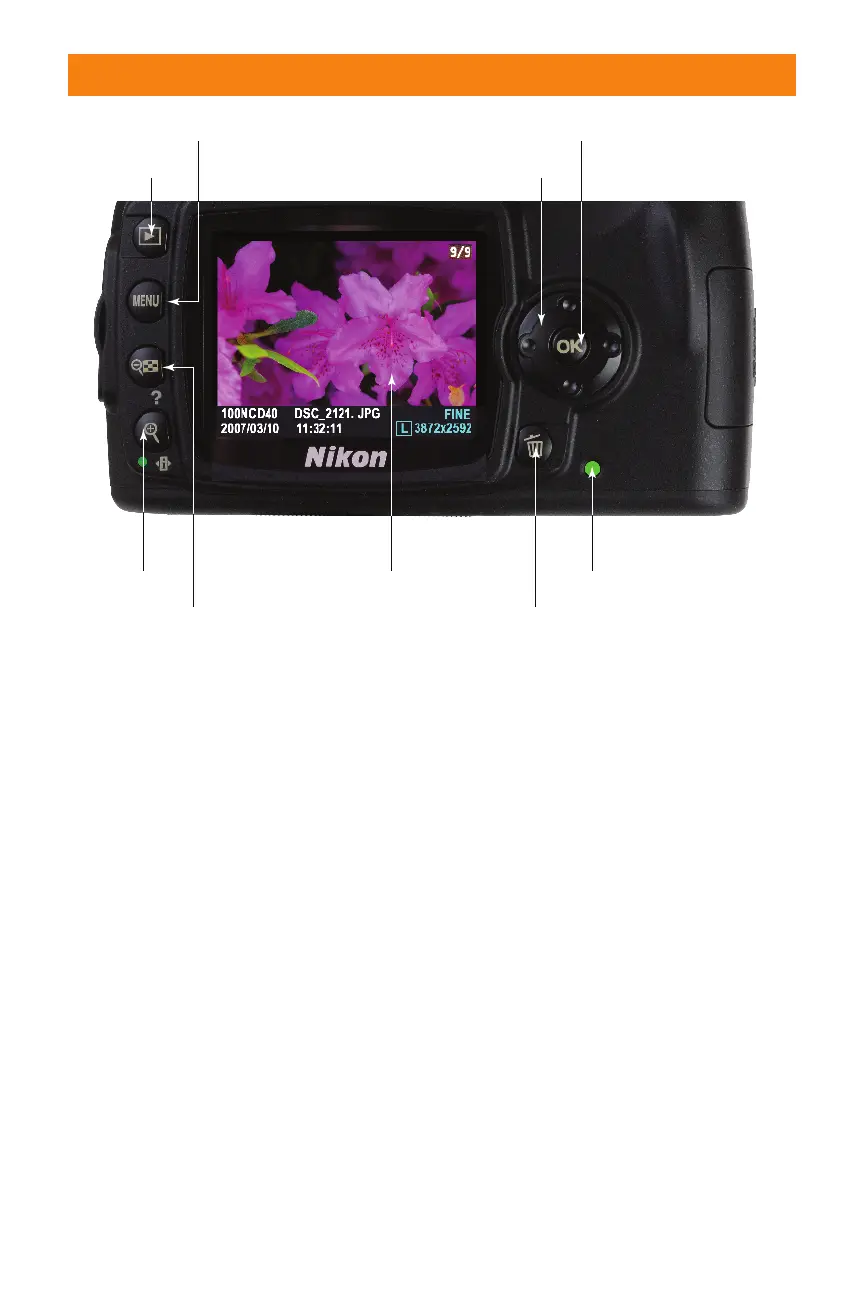
In the center and right side of the lower half
of the Nikon D40/D40x are the LCD monitor
and several more key components:
✦ LCD monitor. This color LCD
shows your images for review, shows
the menus as you navigate through
them, and has the current shooting
status and settings.
✦ Multi selector. Press this four-way
cursor button to navigate through
menus, scroll through images as
you review them, and change the
amount of information about each
image that appears on the LCD
screen during picture review.
28 Part I ✦ Using the Nikon D40/D40x
Memory card access lamp
Playback
Delete
LCD monitor
Thumbnail/
Zoom Out/
Help
Zoom In/
Setting/
Reset (#2)
Menu
Multi selector
OK
1.14 Key components on the lower half of the back panel of the D40/D40x
06_171486 ch01.qxp 8/8/07 6:21 PM Page 28



 To Next Page