format; Graphics, which uses a mixture of
text, graphics, and icons; and Wallpaper,
which uses a photograph you select as a
background, and doesn’t include shutter
speed and aperture information. All illustra-
tions in this book use the Classic format for
the shooting information display, which pro-
vides the maximum amount of information
with the best readability. If you’d prefer to
use one of the other shooting information
displays, I show you how to do that in
Chapter 3.
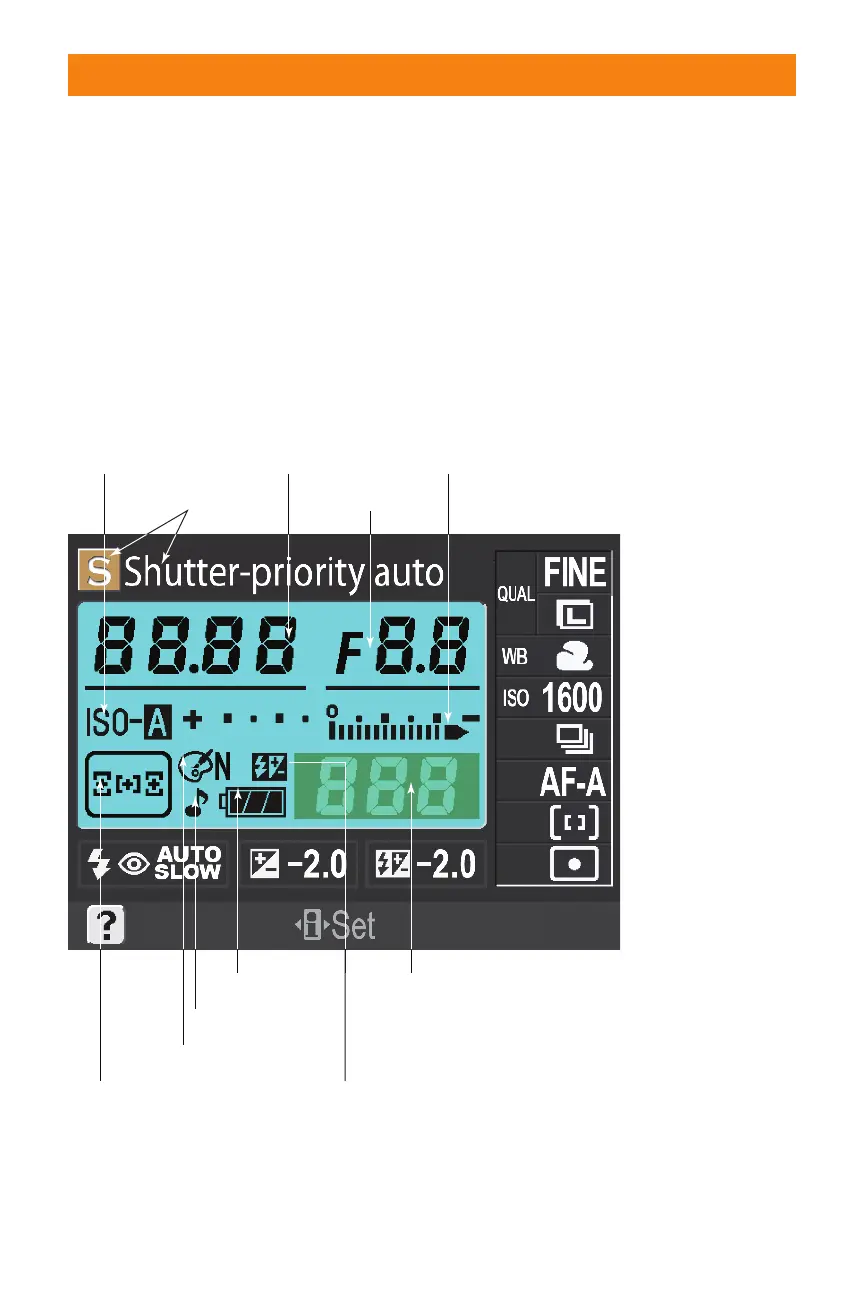
I have divided the screen into two figures.
Figure 1.16 shows the information clustered
around the center status area. Figure 1.17
shows the remaining information indicators
and readouts on the shooting information
display.
Chapter 1 ✦ Exploring the Nikon D40/D40x 31
Focus area display
Auto ISO indicator
Beep indicator
Battery level
Optimize image
Manual flash control/
Flash compensation for
external Speedlight
Number of exposures
remaining/Preset white
balance recording indicator/
PC mode indicator
Mode
Aperture
Analog exposure
display/Exposure
compensation value
Shutter speed
1.16 LCD readouts and indicators, part one
06_171486 ch01.qxp 8/8/07 6:21 PM Page 31



 To Next Page