Activating the onboard
flash
You can set the built-in electronic flash to
pop up automatically when the D40/D40x
detects low light levels while you’re using
Auto, Portrait, Child, Close-Up, or Night
Portrait modes. You can manually pop up
the flash by pressing the Flash button on the
left side of the camera when in Programmed
Auto, Shutter Priority, Aperture Priority, or
Manual modes. Once the flash is in place,
you can choose from the options that follow
by holding down the Flash button and spin-
ning the command dial. Note that not all
flash options are available in every shooting
mode.
You can find a detailed expla-
nation of which options are
available in each mode in
Chapter 6.
If you’re using Programmed Auto or
Aperture Priority modes, you can choose
Chapter 1 ✦ Exploring the Nikon D40/D40x 35
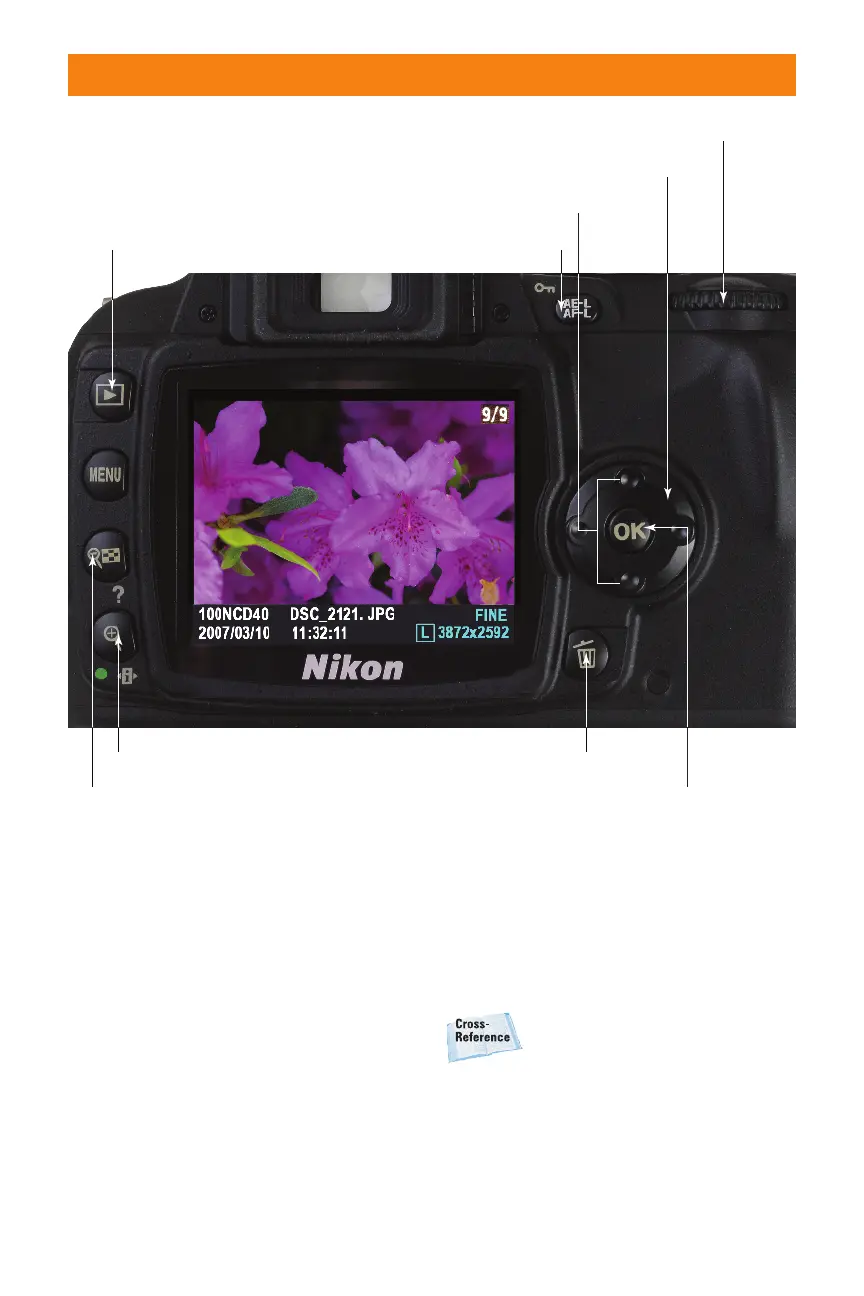
Playback images
Access Retouch menu with current photo
Protect image
Next/previous photo
Move zoomed area
Change type of information displayed
Delete photo
Zoom In/Setting
Thumbnail/Zoom Out
1.18 Review your photos using the color LCD
06_171486 ch01.qxp 8/8/07 6:21 PM Page 35



 To Next Page