When the overall
scene
is
unusually light or
dark
in tone
or
there
rs a
substantial difference
in
contrast
between
the main
subject
and
the
background, the camera's meter may
be
fooled into
giving
the
incorrect
exposure In these
cases, exposure com-
pensation
must
be
made For
your
convenience,
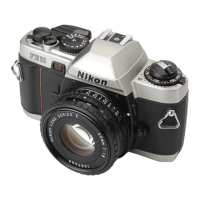
the FE2 fea-
tures two controls for making
exposure compensation-the
exposure compensatron
dial and
memory
lock lever
Suggested
Applications
for Erposure
Gompensation
+ 2
white
background,
snow scene
+
1
white background
occupying
half
of
vrewrng area
-1
spotlighted subject,
black background
occupying
half
of
viewing area
-2
black
background
For
unusual
lighting
situations,
such as snowscapes, backlit
subjects,
or when the main subject contrasts sharply with
the
background,
the
exposure compensation dial allows
adjust
ments to
prevent
over-
or
underexposure
Also, the dial can be
used
to obtain special
effects
like intentional over- or under-
exposure under
normal lighting
conditions Conveniently
oper-
able
on A, the
dial
ranges from
+
2EV to
-zEV
in one-third
increments with the followinq
exceotions.
1) At ASA/ rSO 12
Only
1
step compensation in the +
direction
is
possible,
the
-
direc-
tion is normal
2) At ASA/tSO 16
Only
1 1/3
steps
compensalron in the t
direction
rs
possible:
the
-
direction
is normal
3) Ar ASA/|SO
3200
Only
11/3
steps
compensation in the
-
direction
is
possible,
the
+
direction is normal
4) Ar ASA/rSO 4000
Only
1
step compensation
in the
-
direction
is
possible,
the
+ direc-
lion is normal
atr



 To Next Page