טובניינ טניקרוק
3
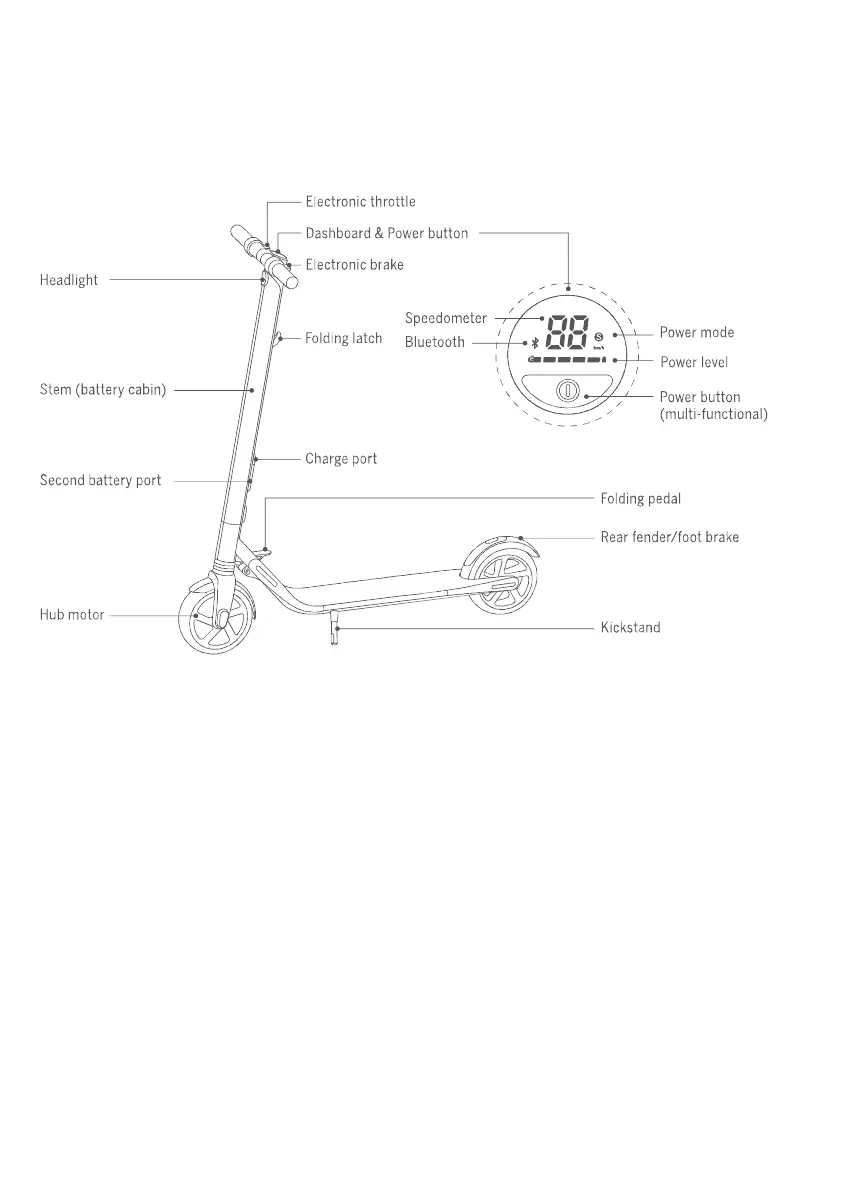
Dashboard & Power Button
Speedometer: Indicates the current speed. Also displays error codes when faults are detected.
Power level: Indicates the remaining battery level with 5 bars.
Each bar equates to approximately 20% power level.
Power mode (double click the power button to switch the mode):
-Red "S" icon: Sport mode (maximum power/speed and reduced range).
-White "S" icon: Standard mode (moderate power/speed and range).
—No “S" icon: Speed limit mode (minimum power/speed and increased range).
Bluetooth: A blinking Bluetooth icon indicates that the vehicle is ready to connect. A solid
Bluetooth icon indicates that the vehicle is connected to a mobile device,
Power button: Short press to power on. Long press to power off. When powered on,
single click to turn on/off the headlight. Double-click to change power mode.
םישרת
סנפ
תוינורטקלא זג תוידי
םינועש ןווכמ
ןודיכ טומ
הללוסה םוקימ
תפסונ הללוס םוקימ
עונמ
תוריהמ דמ
לופיק ןספת
הניעט עקש
חכ ררוב
חכ דמ
הלעפה רותפכ
לופיק תידי
ירוחא ןגמ/לגר םלב
תילגר




 To Next Page