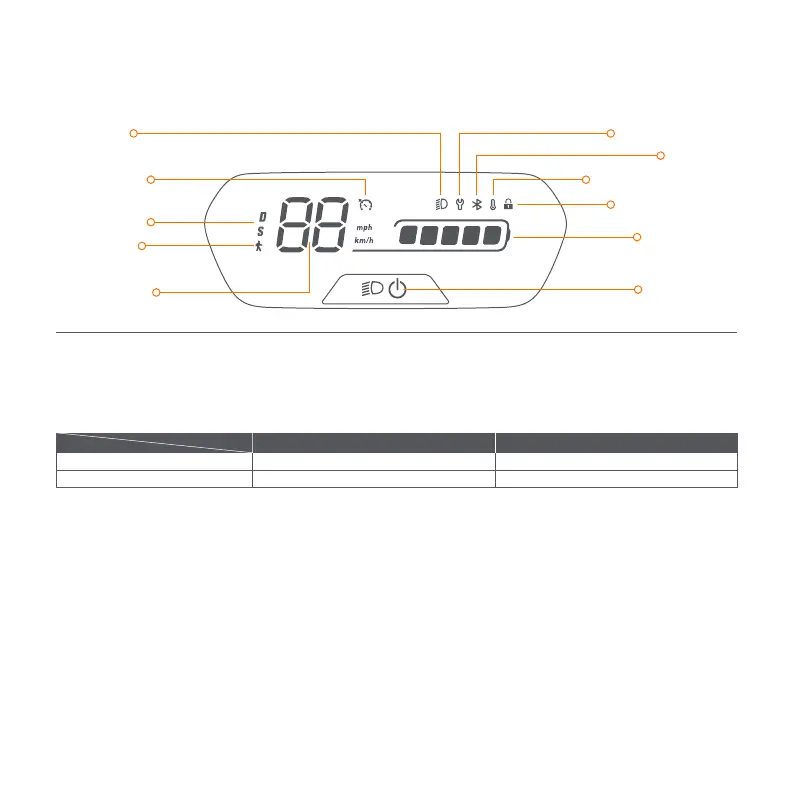
Power Button: Press the button to power on the scooter; press and hold the button for 3 seconds to power it off. When the scooter is on,
press the button to turn on/off the headlight and the tail light, and press twice to switch between the speed modes.
Speedometer: It displays the current speed of the scooter, as well as error codes.
Speed Mode: There are two modes available. The top speed is as follows:
Walk Mode: Max. speed is 5 km/h (3.1 mph). The headlight and tail light are always on and can't be turned off.
* How to enable in the Segway-Ninebot app: Settings > Walk Mode.
Error Notification: It indicates that the scooter has detected an error.
Temperature Warning: It indicates that the battery temperature has reached 55°C (131°F) or is below 0°C (32°F).
* At this point, the vehicle cannot accelerate normally and may not be charged. Do not use until the temperature has reverted to the
normal range.
Bluetooth: It indicates that the scooter has been successfully connected to the mobile device.
Battery Level: The total battery power equals 5 bars.
* The battery power is very low when the first battery bar is red. Please charge your scooter immediately.
Locking Reminder: When the icon lights up, it means the scooter is locked. If abnormal movements are detected, the scooter will start
beeping and the tail light will falsh.
Cruise Mode: When the icon lights up, it means cruise mode is turned on.
Dashboard & Power Button
Speedometer
Temperature Warning
Locking Reminder
Bluetooth
Speed Mode
Walk Mode
Headlight
Cruise Mode
Error Notification
Battery Level
Power Button
Model
Mode
E2 Speed limit E2 Plus Speed limit
15 km/h (9.3 mph)
20 km/h (12.4 mph)
20 km/h (12.4 mph)
25 km/h (15.5 mph)
D (Standard mode)
S (Sport mode)



 To Next Page