EasyManua.ls Logo

Nintendo Controller Pak N64 - Page 2

Nintendo Controller Pak N64
2 pages
Print Icon
To Previous Page IconTo Previous Page
Loading...
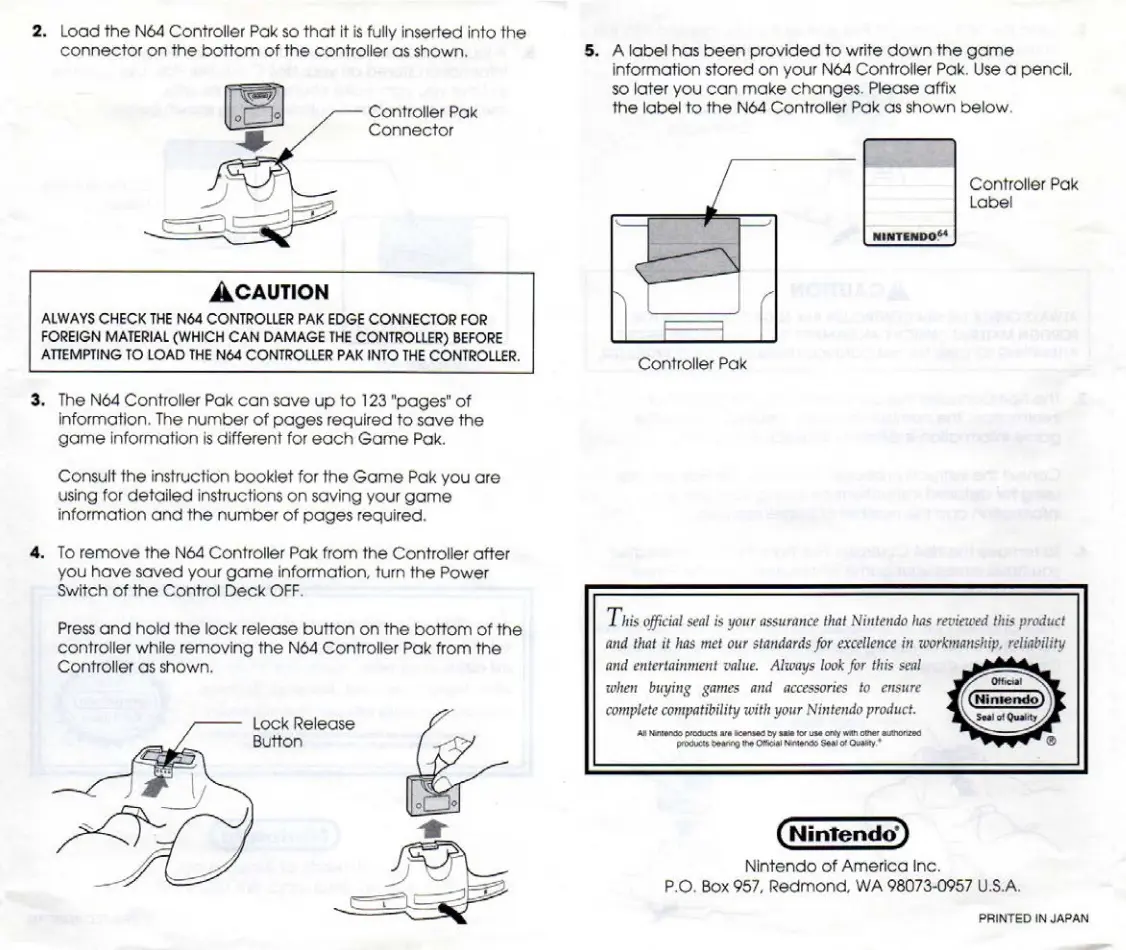
2.
Load
the
Né4
Controller
Pak
so
that
it is
fully
inserted
into
the
connector
on
the
bottom
of
the
controller
as
shown.
5.
Alabel
has
been
provided
to
write
down
the
game
information
stored
on
your
N64
Controller
Pak.
Use
a
pencil,
so
later
you
can
make
changes.
Please
affix
Controller
Pak
the
label
to
the
N64
Controller
Pak
as
shown
below.
Connector
Controller
Pak
Label
ACAUTION
ALWAYS
CHECK
THE
N64
CONTROLLER
PAK
EDGE
CONNECTOR
FOR
|
FOREIGN
MATERIAL
(WHICH
CAN
DAMAGE
THE
CONTROLLER)
BEFORE
ATTEMPTING
TO
LOAD
THE
Né4
CONTROLLER
PAK
INTO
THE
CONTROLLER.
|
Controller
Pak
$3.
The
N64
Controller
Pak
can
save
up
to
123
"pages"
of
information.
The
number
of
pages
required
to
save
the
game
information
is
different
for
each
Game
Pak.
Consult
the
instruction
booklet
for
the
Game
Pak
you
are
using
for
detailed
instructions
on
saving
your
game
information
and
the
number
of
pages
required.
4.
To
remove
the
N6éd4
Controller
Pak
from
the
Controller
after
you
have
saved
your
game
information,
turn
the
Power
switch
of
the
Control
Deck
OFF.
Press
and
hold
the
lock
release
button
on
the
bottom
of
the
This
official
seal
is
your
assurance
that
Nintendo
has
reviewed
this
product
controller
while
removing
the
N64
Controller
Pak
from
the
and
that
it
has
met
our
standards
for
excellence
in
workmanship,
reliability
Controller
as
shown.
and
entertainment
value.
Always
look
for
this
seal
when
buying
games
and
accessories
to
ensure
complete
compatibility
with
your
Nintendo
product.
Lock
Release
Button
Al
Manno
rich
are
ioe
by
sake
for
Lie
ony
atin
ofer
auihorized
Products
Daring
the
Official
Mimands
Seal
of
Quanity.”
Nintendo
of
America
Inc.
P.O.
Box
957,
Redmond,
WA
98073-0957
U.S.A.
PRINTED
IN
JAPAN