1-2 Getting Started
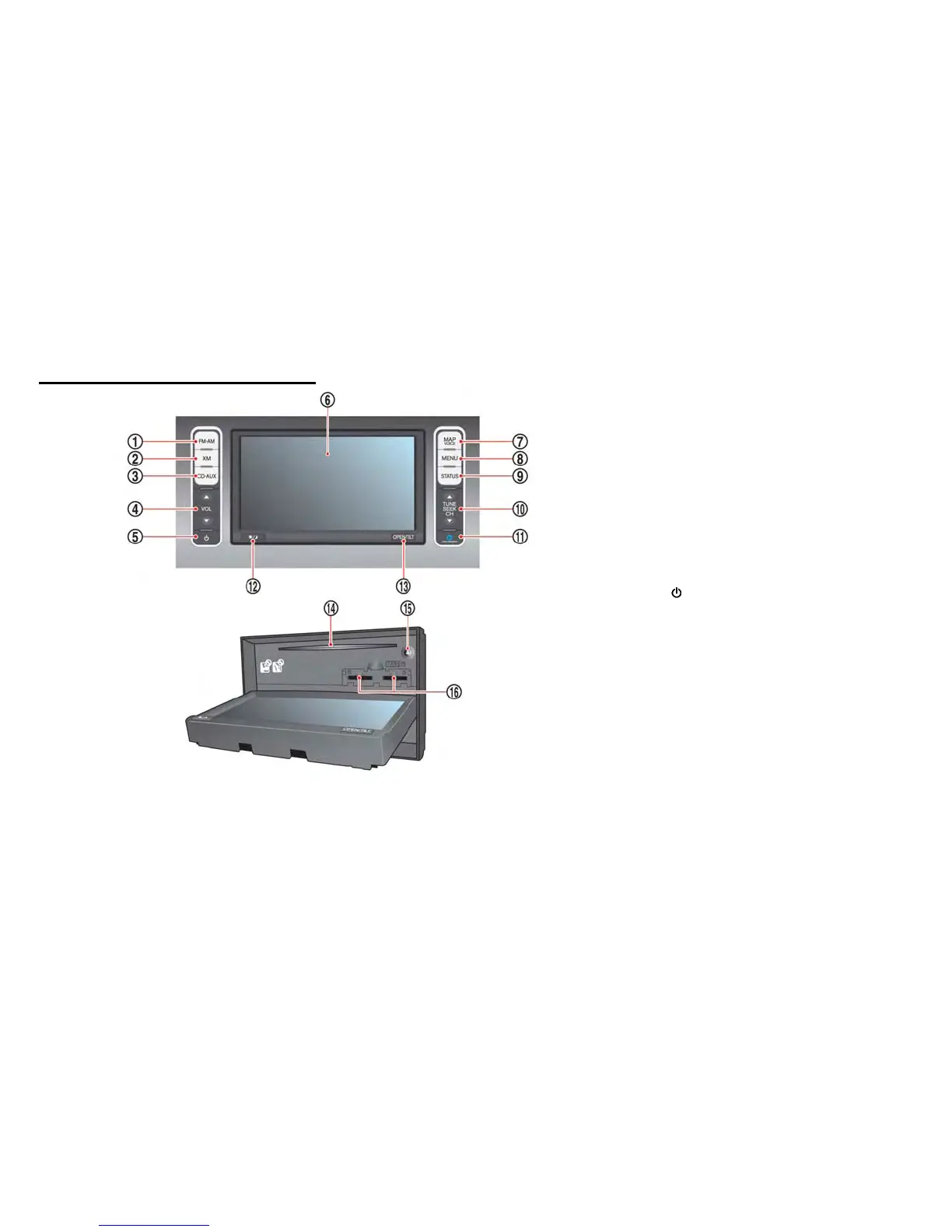
CONTROL PANEL
*
1
FM·AM button:
Push to switch between the FM the AM radio
bands.
*
2
XM button:
Push to switch to an XM satellite radio band.
*
3
CD·AUX button:
Push to switch between USB memory/iPod
®
player/CD/Bluetooth
®
streaming audio/AUX
screens.
*
4
VOL (Volume control) button:
Push to adjust the volume of the audio system.
*
5
(Audio system ON·OFF) button:
Push to turn the audio system on or off.
*
6
Monitor:
*
7
MAP button/VOICE button:
Push to display the current location map screen.
Push and hold to repeat voice guidance.
*
8
MENU button:
Push to display the setting menu (destination,
route, information, settings, phone and CAR-
WINGS
TM
) screen.
*
9
STATUS button:
Push to display the current status of the climate
control, radio, audio, vehicle information (driving
range and average energy economy) and naviga-
tion systems.
*
10
TUNE SEEK CH button:
Push to select a track/station. Push and hold to
search for a track/station automatically or to fast-
forward/rewind when listening to music.
CONTROL BUTTONS AND
FUNCTIONS



 To Next Page