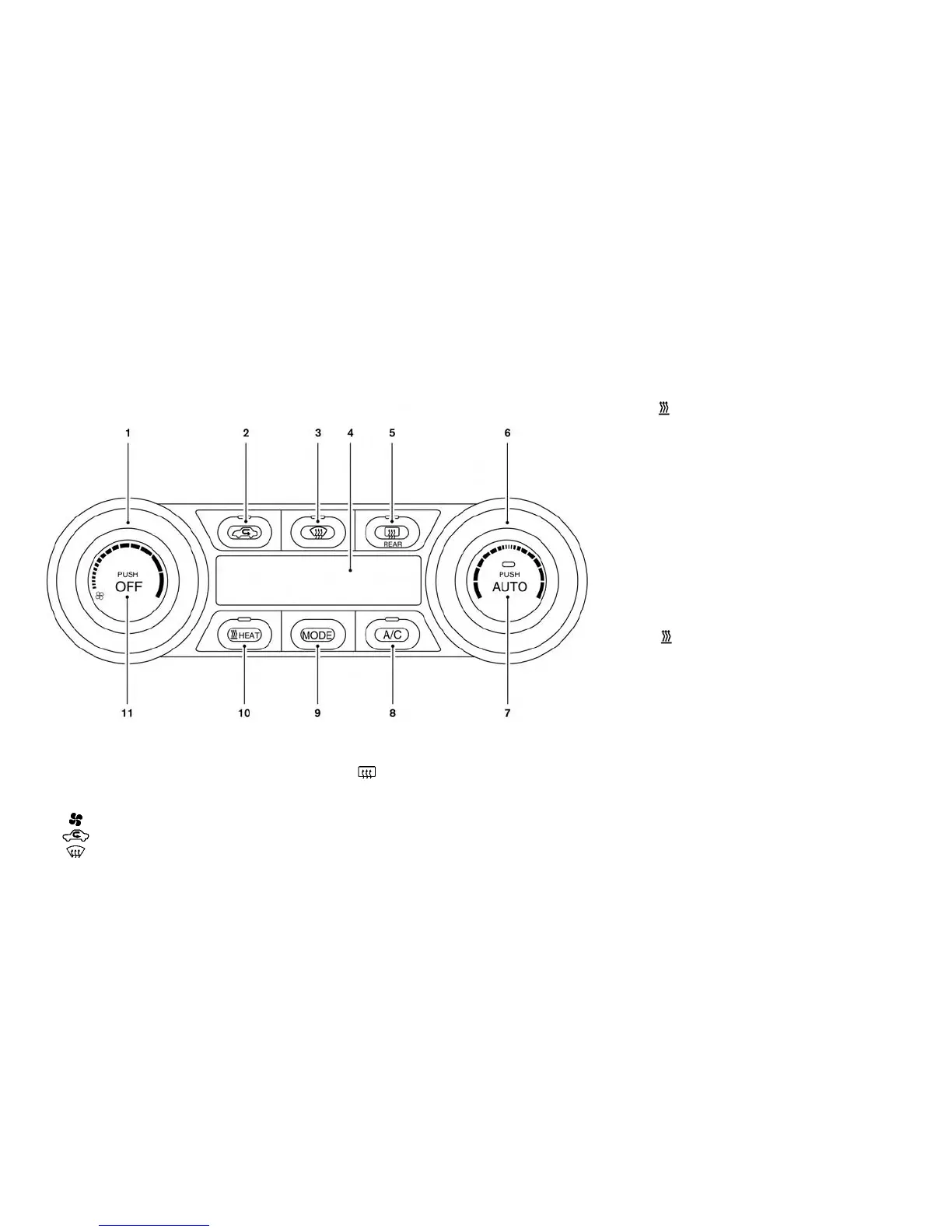
AUTOMATIC CLIMATE CONTROL
(MODELS WITHOUT NAVIGATION
SYSTEM)
1. (fan speed control) dial
2.
(intake air control) button
3.
(front defroster) button
4. Climate Ctrl. display
5.
Rear window and outside mirror (if
so equipped) defroster switch
6. Temperature control dial
7. AUTO climate control ON button
8. A/C (air conditioner) button
9. MODE (manual air flow control) button
10.
(HEAT) button
11. Climate control system OFF button
Automatic operation (AUTO)
The AUTO mode may be used year-round as the
system automatically controls constant tempera-
ture, air flow distribution and fan speed.
1. Press the AUTO button. The AUTO indicator
will be illuminated.
2. Turn the temperature control knob to set the
desired temperature.
When any of the following functions are oper-
ated, the AUTO indicator will turn off.
• The
(HEAT) or A/C button is pressed.
• The fan speed control or ventilator air flow con-
trol is operated.
• The intake air control is switched.
However, the functions that were not operated
continue operating in AUTO mode.
4-26 Display screen, heater, air conditioner, audio and phone systems



 To Next Page