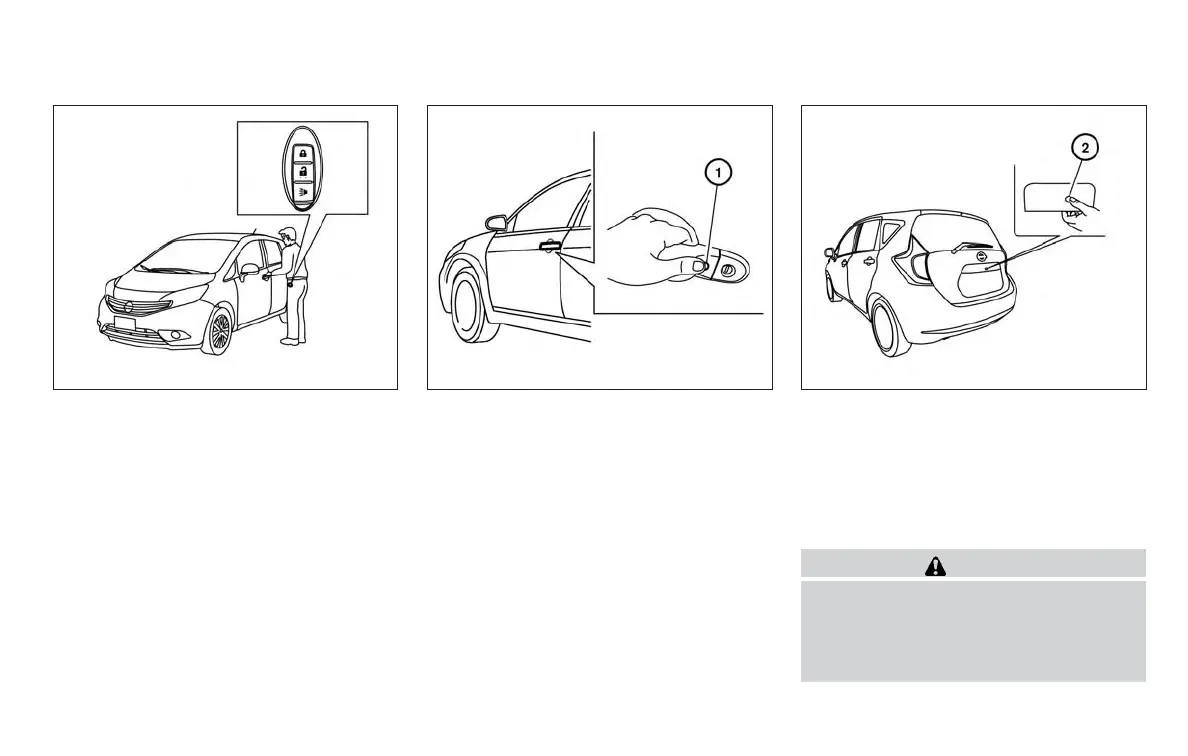
Locking doors
1. Place the ignition switch to the LOCK posi-
tion.
2. Close all doors and the rear hatch.
3. Push any door handle request switch
䊊
1
or
the rear hatch request switch
䊊
2
while car-
rying the Intelligent Key with you.
4. All doors and the rear hatch will lock.
5. The hazard warning lights flash twice and
the outside buzzer sounds once.
NOTE:
● Doors lock with the door handle re-
quest switch or rear hatch request
switch while the ignition switch is
pushed in.
● Doors lock with the door handle re-
quest switch or the rear hatch request
switch while the ignition switch is not
in the LOCK position.
● Doors do not lock with the door handle
request switch or the rear hatch re-
quest switch with the Intelligent Key
inside the vehicle and a beep sounds to
warn you. However, when an Intelligent
Key is inside the vehicle, doors can be
locked with another Intelligent Key.
CAUTION
● After locking the doors using the re-
quest switch, make sure that the doors
have been securely locked by operating
the door handles or the rear hatch
opener switch.
LPD2164 LPD2165 LPD2167
Pre-driving checks and adjustments 3-15



 To Next Page