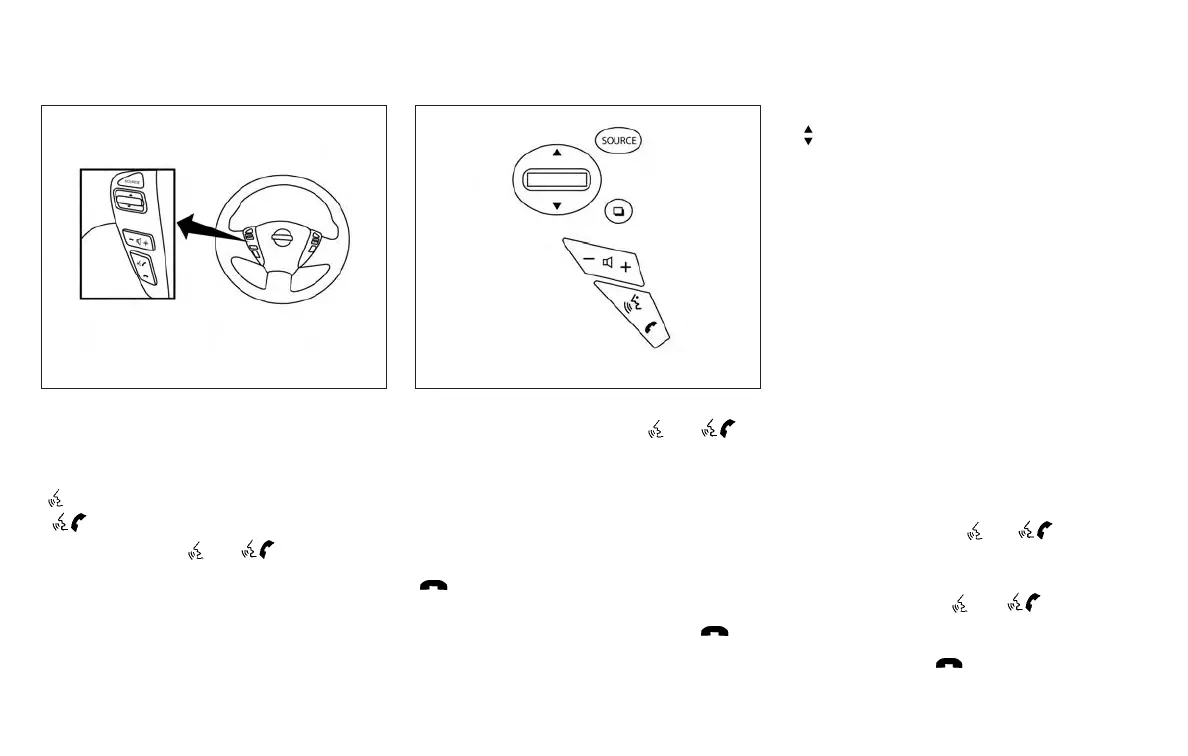
CONTROL BUTTONS
The control buttons for the Bluetooth® Hands-Free
Phone System are located on the steering wheel.
/
PHONE/SEND
Press the
/ button to
initiate a VR session or answer an
incoming call.
You can also use the
/
button to interrupt the system feed-
back and give a command at once.
For additional information, refer to
“List of voice commands” and “Dur-
ing a call” in this section.
PHONE/END
While the voice recognition system
is active, press and hold the
button for 5 seconds to quit the
voice recognition system at any time.
TUNING SWITCH
While using the voice recognition
system, tilt the tuning switch up or
down to manually control the phone
system.
GETTING STARTED
The following procedures will help you get
started using the Bluetooth® Hands-Free Phone
System with NISSAN Voice Recognition. For ad-
ditional information, refer to “List of voice com-
mands” in this section.
Choosing a language
You can interact with the Bluetooth® Hands-
Free Phone System using English, Spanish or
French.
To change the language, perform the following.
1. Press and hold the
/ button for
more than 5 seconds.
2. The system announces: “Press the
PHONE/SEND (
/ ) button for
the hands-free phone system to enter the
voice adaptation mode or press the
PHONE/END (
) button to select a dif-
ferent language.”
Type A (if so equipped)
LHA3002
Type B (if so equipped)
LHA3095
4-84 Monitor, climate, audio, phone and voice recognition systems



 To Next Page