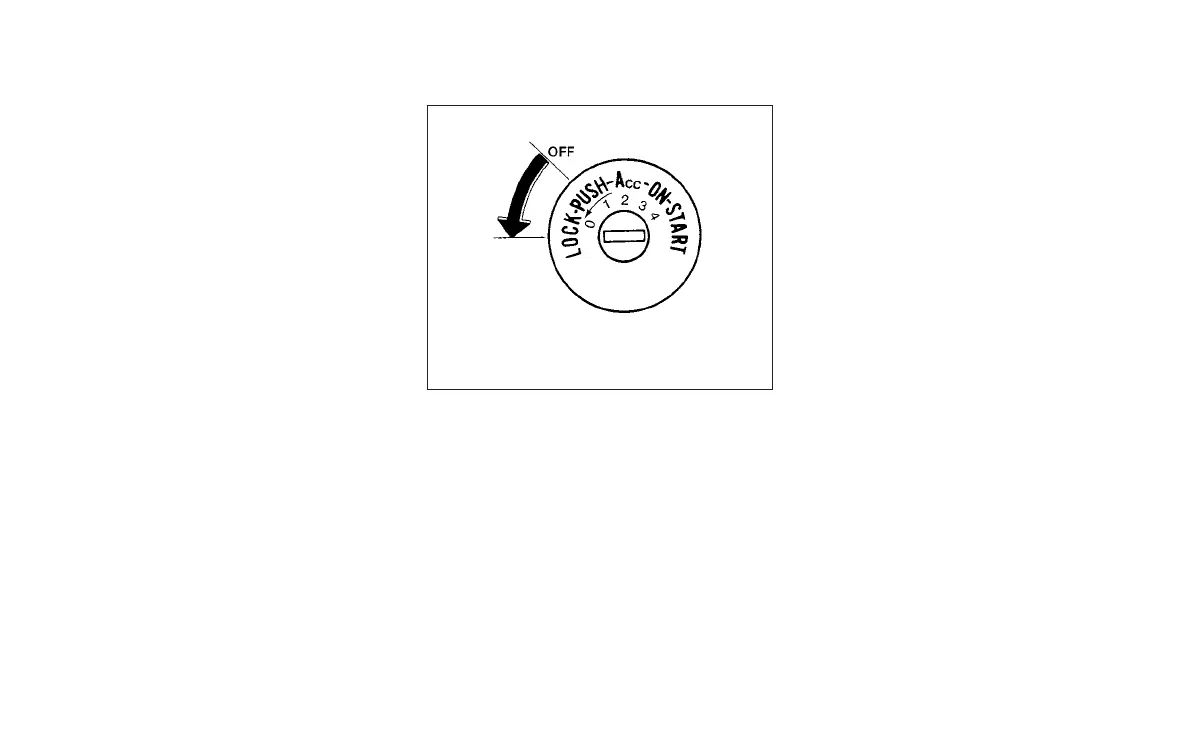
When the ignition switch cannot be placed to the
LOCK position:
1. Shift the shift lever to the P (Park) position.
2. Move the ignition switch slightly in the ON
direction.
3. Turn the ignition switch to the LOCK posi-
tion.
4. Remove the key if it is inserted in the ignition
switch.
If the ignition switch is placed to the LOCK posi-
tion, the shift lever cannot be moved from the P
(Park) position.
The shift lever can be moved if the ignition
switch is in the ON position and the foot
brake pedal is depressed.
There is an OFF position
䊊
1
between the
LOCK and ACC positions. The OFF position
is indicated by a “1” on the key cylinder.
MANUAL TRANSMISSION (if so
equipped)
The ignition switch includes a device that helps
prevent accidental removal of the key while driv-
ing.
The key can only be removed when the ignition
switch is in the LOCK position.
In order for the steering wheel to be locked, it
must be turned about 1/8 of a turn clockwise
from the straight up position.
To lock the steering wheel, place the igni-
tion switch in the LOCK position. Remove
the key. To unlock the steering wheel, in-
sert the key and turn it gently while rotating
the steering wheel slightly right and left.
IGNITION SWITCH POSITIONS
LOCK: Normal parking position (0)
OFF: (1)
The engine can be turned off without locking the
steering wheel.
ACC: (Accessories) (2)
This position activates electrical accessories
such as the radio when the engine is not running.
ON: Normal operating position (3)
This position turns on the ignition system and the
electrical accessories.
START: (4)
This position starts the engine. As soon as the
engine has started, release the key. It automati-
cally returns to the ON position.
WSD0052
Starting and driving 5-9



 To Next Page