To view detailed instructional videos regarding these and other features,
please go to www.nissanownersinfo.mobi.
4
NEW SYSTEM FEATURES
AROUND VIEW®
MONITOR (if so equipped)
With the power switch in the ON position, the
Around View®
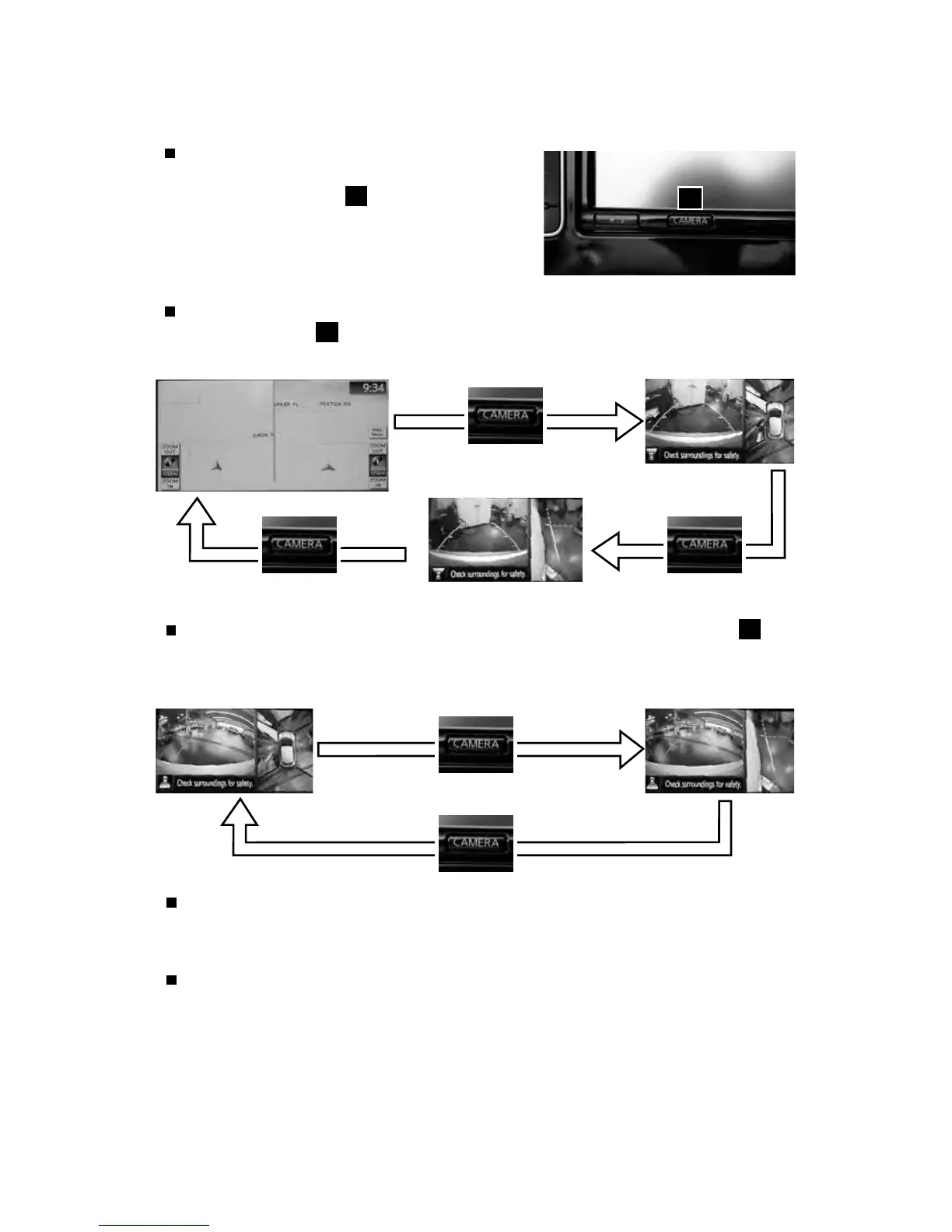
Monitor is activated by pressing
the CAMERA button
1
, located on the
navigation unit, or by moving the shift lever
to the R (REVERSE) position. The monitor
displays various views of the position of
the vehicle.
When the vehicle is in the P (PARK), N (NEUTRAL) or D (DRIVE) position and the
CAMERA button
1
is pressed, the following views will display in order:
1
When the vehicle is in the R (REVERSE) position and the CAMERA button
1
is
pressed, the following views will display in order:
Start from any Control Panel screen
Rear view & bird’s-eye view
Front view & front-side view
Press
PressPress
Front view & bird’s-eye view
Rear view & front-side view
The colored guide lines on the display screen indicate vehicle width and
approximate distances to objects with reference to the vehicle body line.
• Red 1.5 ft (0.5 m); Yellow 3 ft (1 m); Green 7 ft (2 m) and 10 ft (3 m).
For information regarding how to access additional viewing cycles, please see
your Owner’s Manual.
Press
Press



 To Next Page