To view detailed instructional videos regarding these and other features,
please go to www.nissanownersinfo.mobi.
31
FIRST DRIVE FEATURES
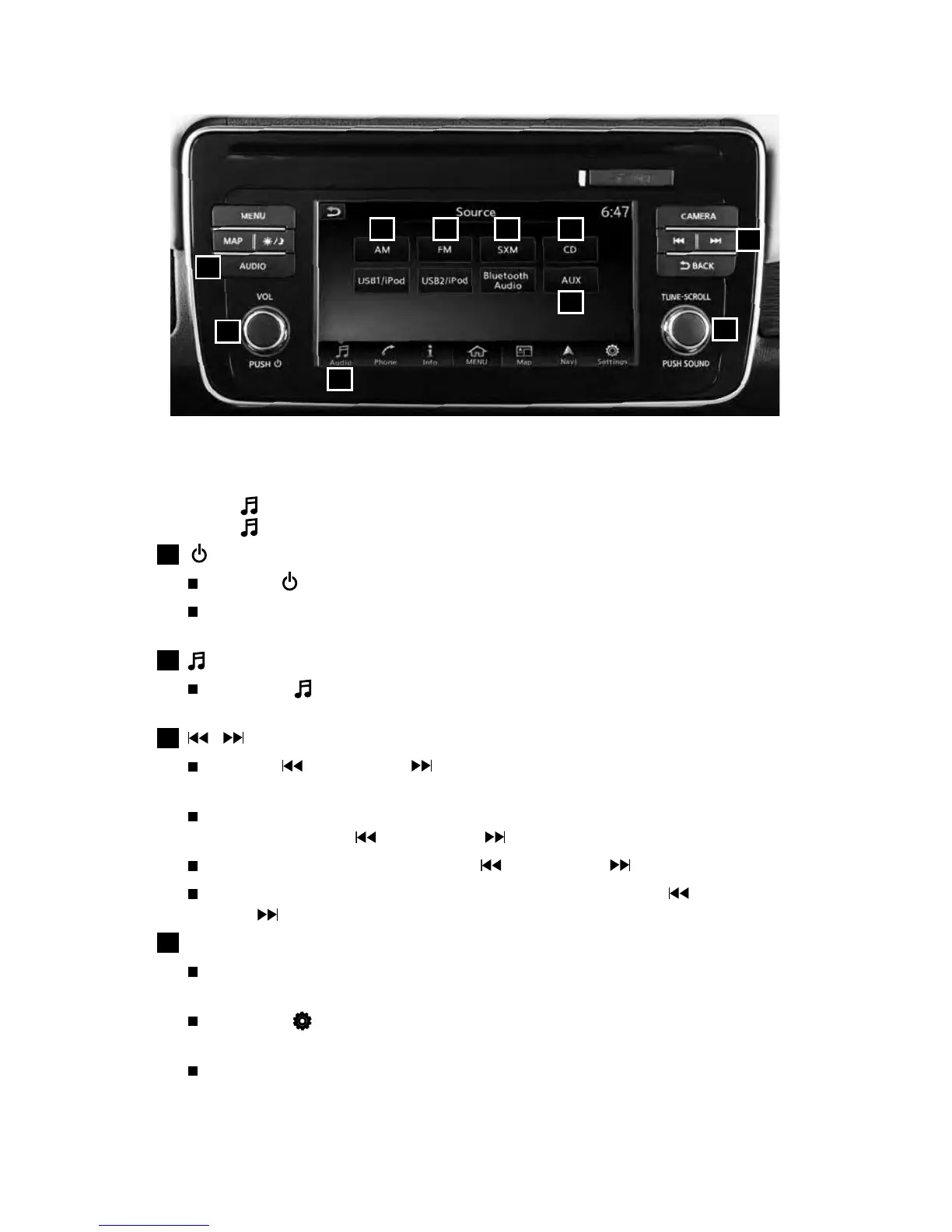
FM/AM/SiriusXM® SATELLITE RADIO WITH CD PLAYER
(if so equipped)
Touch the
”
Audio” key on the Launch Bar to display the current audio source.
Touch the
”
Audio” key a second time to access the source selection screen.
1
(ON•OFF) BUTTON/VOL (volume) CONTROL KNOB
Press the (on•o) button to turn the audio system on or o.
Turn the VOL (volume) control knob right or left to increase or decrease
the volume.
2
AUDIO KEY
Touch the
”
Audio” key on the Launch Bar to bring up the current source’s
control screen.
3
/ (SEEK and CAT/TRACK) BUTTONS
Press the button or the button to seek up or down to the next
receivable station.
For satellite radio to switch to the rst channel of the previous or next
category, press the button or the button.
To change tracks on a CD, press the button or the button.
To rewind or fast forward a track on a CD, press and hold the button
or the button.
4
SOUND BUTTON/TUNE•SCROLL KNOB
Press the SOUND button to cycle through the audio settings individually and
use the TUNE•SCROLL knob to adjust the current setting.
Touch the ” Settings” key on the Launch Bar and then touch the “Sound”
key to view all audio settings.
To manually tune the radio, turn the TUNE•SCROLL knob left or right.
1
4
2
3
6 7 8 9
5
10
2948550_18a_Leaf_QRG_100317.indd 31 10/3/17 3:59 PM



 To Next Page