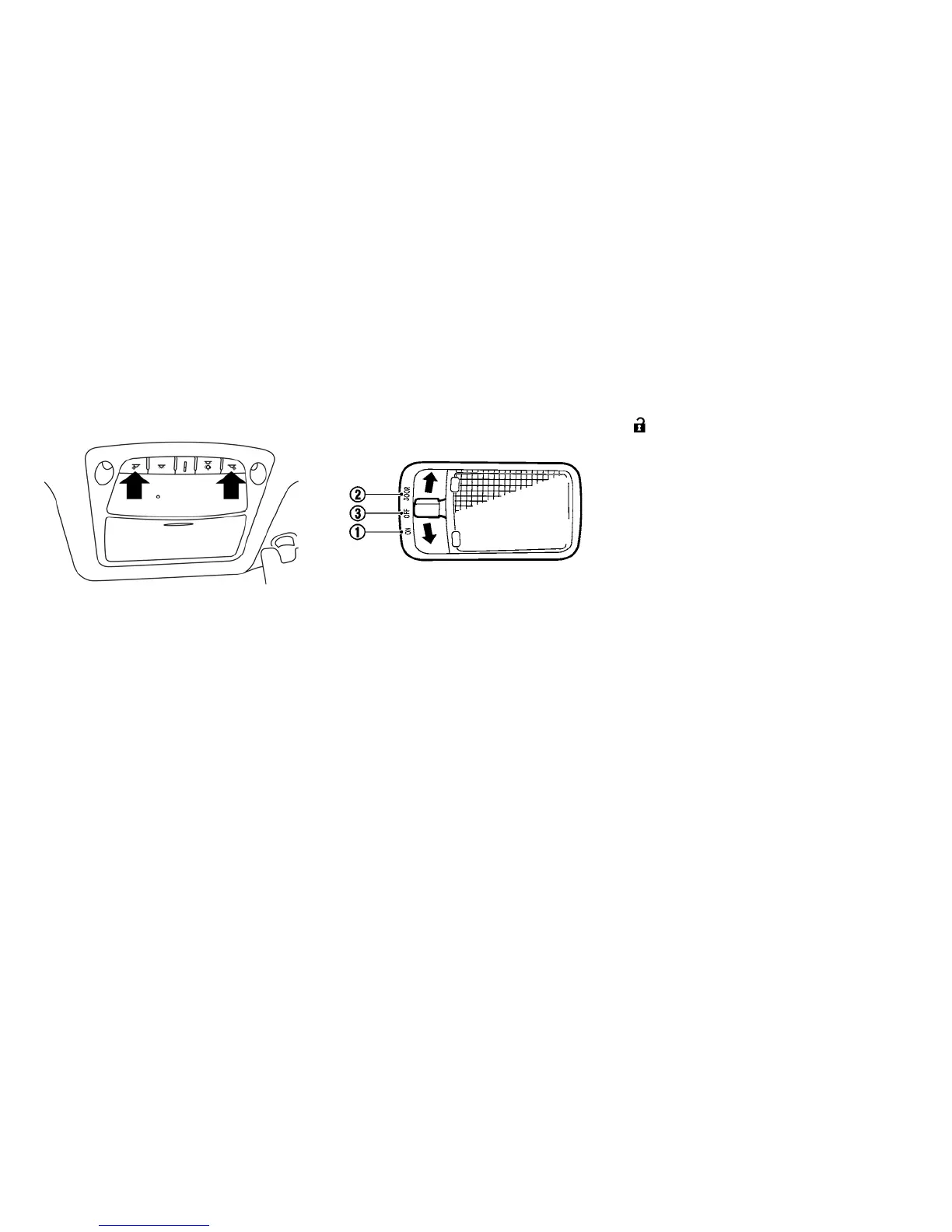
MAP LIGHTS
Push the button to turn the map lights on. To turn
them off, press the button again.
CEILING LIGHT
The ceiling light switch has three positions: ON ,
DOOR and OFF.
ON position
When the switch is in the ON position
䊊
1
, the
ceiling light will illuminate.
DOOR position
When the switch is in the DOOR position
䊊
2
, the
ceiling light will illuminate under the following
conditions:
•
the power switch is placed in the LOCK position.
– remains on for about 15 seconds.
• doors are unlocked by pushing the UNLOCK
button or the request switch, with the
power switch in the LOCK position
– remains on for about 15 seconds.
• any door is opened and then closed with the
power switch in the LOCK position
– remains on for about 15 seconds.
• any door is opened with the power switch in the
ACC or ON position
– remains on while the door is opened. When
the door is closed, the light turns off.
The light will automatically turn off after 10
minutes when the light remains illuminated
to prevent the battery from becoming dis-
charged.
OFF position
When the switch is in the OFF position
䊊
3
, the
ceiling light will not illuminate, regardless of the
condition.
Instruments and controls 2-57





 To Next Page