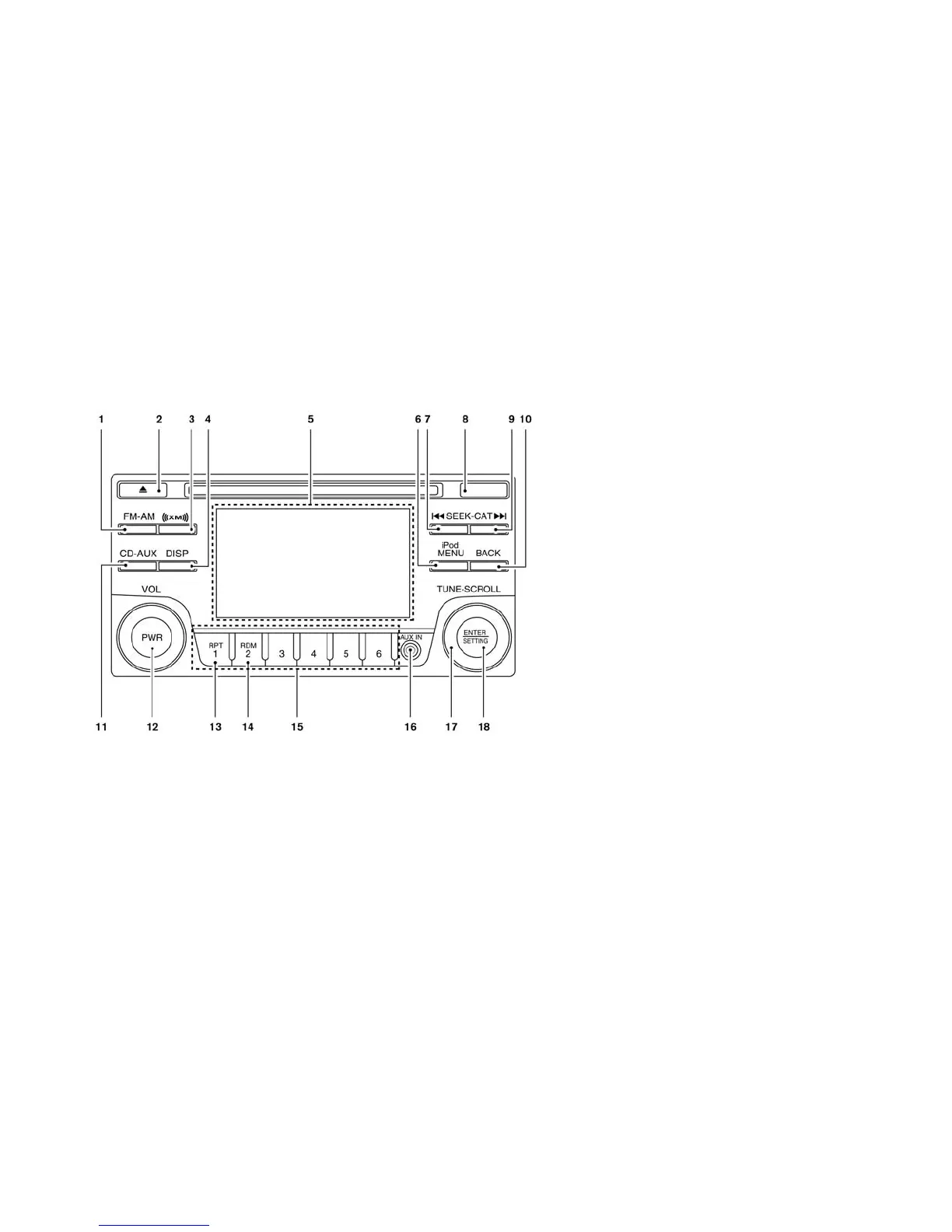
FM-AM-SAT RADIO WITH
COMPACT DISC (CD) PLAYER
(MODELS WITHOUT NAVIGATION
SYSTEM)
1. FM·AM band select button
2. CD EJECT button
3. XM band select button
4. DISP (display) screen
5. Color display
6. iPod MENU button
7. Radio CAT (category)/REW (rewind) button
for SEEK/TRACK
8. Radio SCAN tuning button
9. Radio CAT (category)/FF (fast forward) but-
ton for SEEK/TRACK
10. BACK button
11. CD·AUX button
12. PWR (power) button/VOL (volume) control
knob
13. RPT (repeat) play button
14. RDM (random) play button
15. Radio station preset select buttons
16. AUX IN jack
17. TUNE·SCROLL control knob
18. ENTER/SETTING button
For all operation precautions, see “Audio opera-
tion precautions” in this section.
• No satellite radio reception is available when the
SAT band option is selected unless the optional
satellite receiver and antenna are installed, and
there is an active SiriusXM Satellite Radio sub-
scription.
• The satellite radio mode requires an active Siri-
usXM Satellite Radio subscription. The satellite
radio is not available in Alaska, Hawaii and
Guam.
• It may take some time to receive the activation
signal after subscribing the SiriusXM Satellite
Radio. After receiving the activation signal, an
Heater, air conditioner, audio and phone systems 4-35





 To Next Page