[ Edit: 2016/ 11/ 24 Model: E12-A ]
8-18 Maintenance and do-it-yourself
Checking battery fluid level
E12-A-120227-47FFFBAB-1BC0-4DE1-9178-F4C1DD6AE5B8
DI0137MA
SDI1480
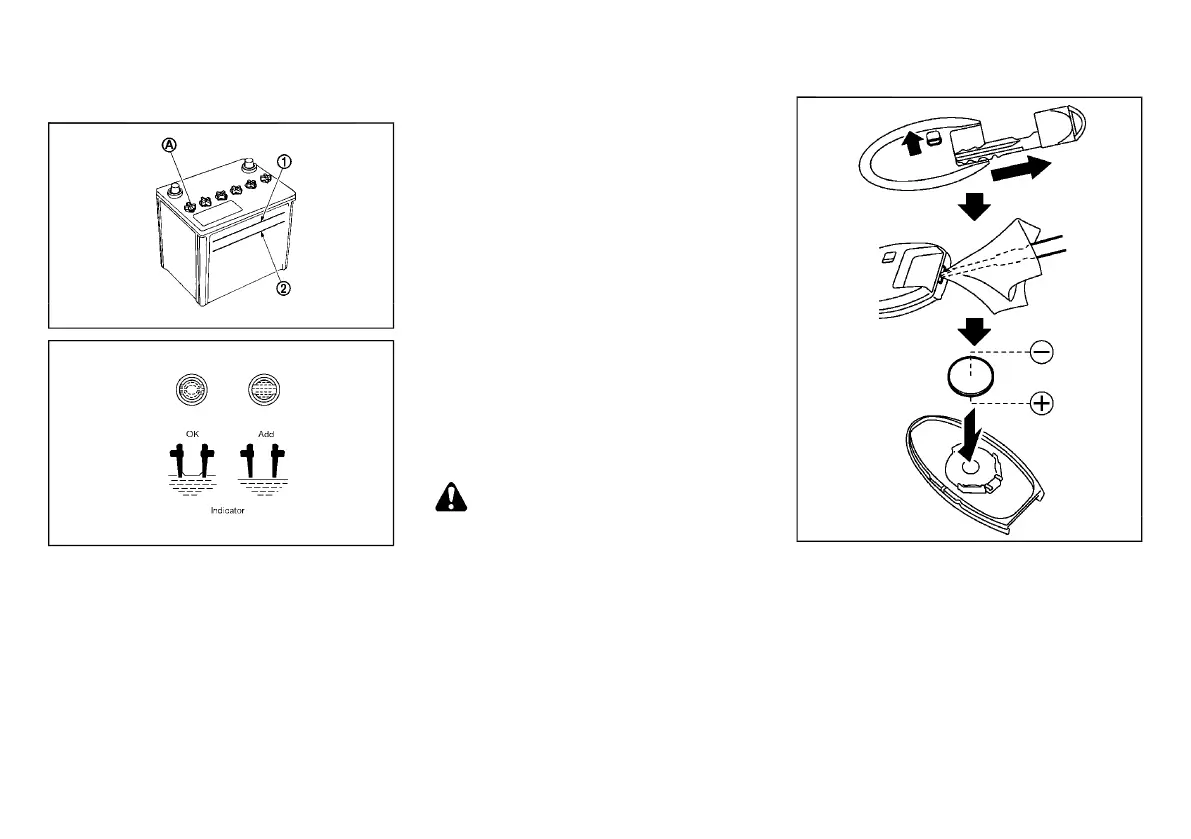
Check the fluid level in each cell. The battery fluid level
should be between the UPPER LEVEL
*
1
and
LOWER LEVEL
*
2
lines.
If it is necessary to add fluid, add only demineralized/
distilled water to bring the level to the indicator in each
filler opening. Do not overfill.
1. Remove the cell plugs
*
A
, if equipped.
2. Add demineralized/distilled water up to the
UPPER LEVEL
*
1
line.
3. Replace and tighten the cell plugs.
. Vehicles operated in high temperatures or under
severe conditions require frequent checks of the
battery fluid level.
. Keep the battery surface clean and dry. Clean the
battery with a solution of baking soda and water.
. Make certain the terminal connections are clean
and securely tightened.
. If the vehicle is not to be used for more than 30
days, disconnect the negative (−) battery terminal
cable to prevent battery discharge.
Jump starting
E12-A-120227-E4F41EE9-38D0-4544-9847-FEF589C32D36
If jump starting is necessary, see “Jump starting” (P.6-
8). If the engine does not start by jump starting or the
battery does not charge, the battery may have to be
replaced. Contact a NISSAN dealer for replacing the
battery.
INTELLIGENT KEY BATTERY
E12-A-120227-54391E5B-56A2-4553-A297-5C68724A1416
Battery replacement
E12-A-120227-0BBD5A11-27BD-4EA7-9405-79045676C1F0
CAUTION:
. Be careful not to allow children to swallow
the battery and removed parts.
. An improperly disposed battery can harm
the environment. Always confirm local reg-
ulations for battery disposal.
. When changing batteries, do not let dust or
oil get on the components.
. There is danger of explosion if lithium
battery is incorrectly replaced. Replace only
with the same or equivalent type.
SDI2451
To replace the battery:
1. Release the lock knob at the back of the Intelligent
Key and remove the mechanical key.
2. Insert a small screwdriver into the slit of the corner
and twist it to separate the upper part from the
lower part. Use a cloth to protect the casing.
3. Replace the battery with a new one.
.
Recommended battery: CR2025 or equivalent
.
Do not touch the internal circuit and electric
terminals as doing so could cause a malfunc-
tion.
Condition:



 To Next Page