[ Edit: 2016/ 11/ 24 Model: E12-A ]
3-2 Pre-driving checks and adjustments
E12-A-120227-474CE877-D8D3-4CC0-A477-C8DD76387FDF
Your vehicle can only be driven with the keys specific
to your vehicle. A key number plate is supplied with
your key. Record the key number and keep the key
number plate in a safe place, except in the vehicle, in
case of the need to duplicate the keys.
The key can only be duplicated using an original key or
the original key number. The key number is required
when you have lost all of the keys and do not have the
original key to duplicate from. If the key is lost, or you
need extra keys, provide an original key or the key
number to a NISSAN dealer.
CAUTION:
Do not leave the keys inside the vehicle when
leaving the vehicle.
INTELLIGENT KEY
E12-A-120227-50A5ADA8-CF6B-4C12-A3FA-E8A51666DDA5
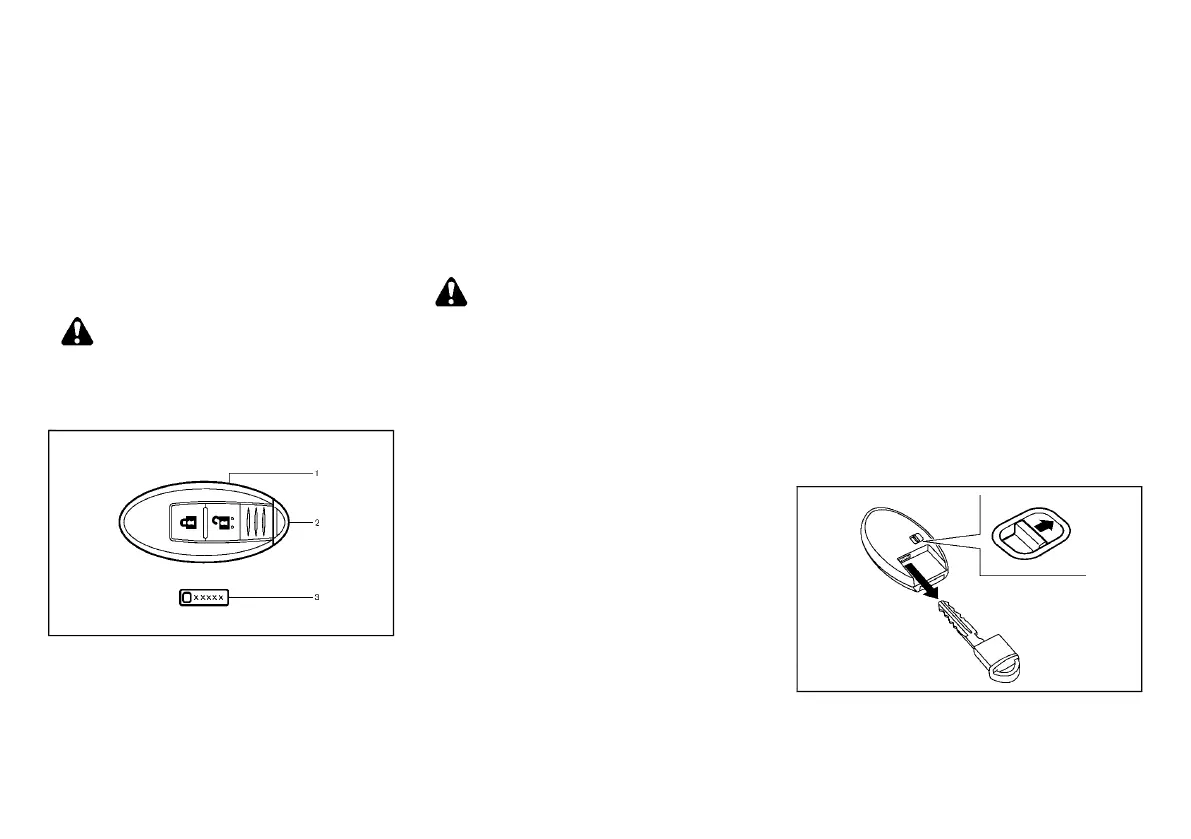
SPA2502
1. Intelligent Key (2 sets)
2. Mechanical key (inside the Intelligent Key) (2
sets)
3. Key number plate
Your vehicle can only be driven with the Intelligent
Keys, which are registered to your vehicle’s Intelligent
Key system components and NISSAN Anti-Theft
System (NATS*) components. As many as 4 Intelligent
Keys can be registered and used with one vehicle. The
new keys must be registered by a NISSAN dealer prior
to use with the Intelligent Key system and NATS of your
vehicle. Since the registration process requires erasing
all memory in the Intelligent Key components when
registering new keys, be sure to take all Intelligent Keys
that you have to the NISSAN dealer.
*: Immobilizer
CAUTION:
. Be sure to carry the Intelligent Key with you.
Do not leave the vehicle with the Intelligent
Key inside.
. Be sure to carry the Intelligent Key with you
when driving. The Intelligent Key is a preci-
sion device with a built-in transmitter. To
avoid damaging it, please note the follow-
ing.
— The Intelligent Key is water resistant;
however, wetting may damage the In-
telligent Key. If the Intelligent Key gets
wet, immediately wipe until it is com-
pletely dry.
— Do not bend, drop or strike it against
another object.
— If the outside temperature is below
−108C (14 8F), the battery of the Intelli-
gent Key may not function properly.
— Do not place the Intelligent Key for an
extended period in a place where tem-
peratures exceed 608C (1408F).
— Do not change or modify the Intelligent
Key.
— Do not use a magnet key holder.
— Do not place the Intelligent Key near
equipment that produces a magnetic
field such as a TV, audio equipment
and personal computers or cellular
phones.
— Do not allow the Intelligent Key to come
into contact with water or salt water,
and do not wash it in a washing
machine. This could affect the system
function.
. If an Intelligent Key is lost or stolen, NISSAN
recommends erasing the ID code of that
Intelligent Key. This will prevent the Intelli-
gent Key from unauthorized use to unlock
the vehicle. For information regarding the
erasing procedure, please contact a NISSAN
dealer.
Mechanical key
E12-A-120227-2D840B4A-9FC2-4A2A-A743-FA184E537385
SPA2033
To remove the mechanical key, release the lock knob at
the back of the Intelligent Key.
To install the mechanical key, firmly insert it into the
Intelligent Key until the lock knob returns to the lock
KEYS
Condition:


 To Next Page
 Loading...