[ Edit: 2016/ 11/ 24 Model: E12-A ]
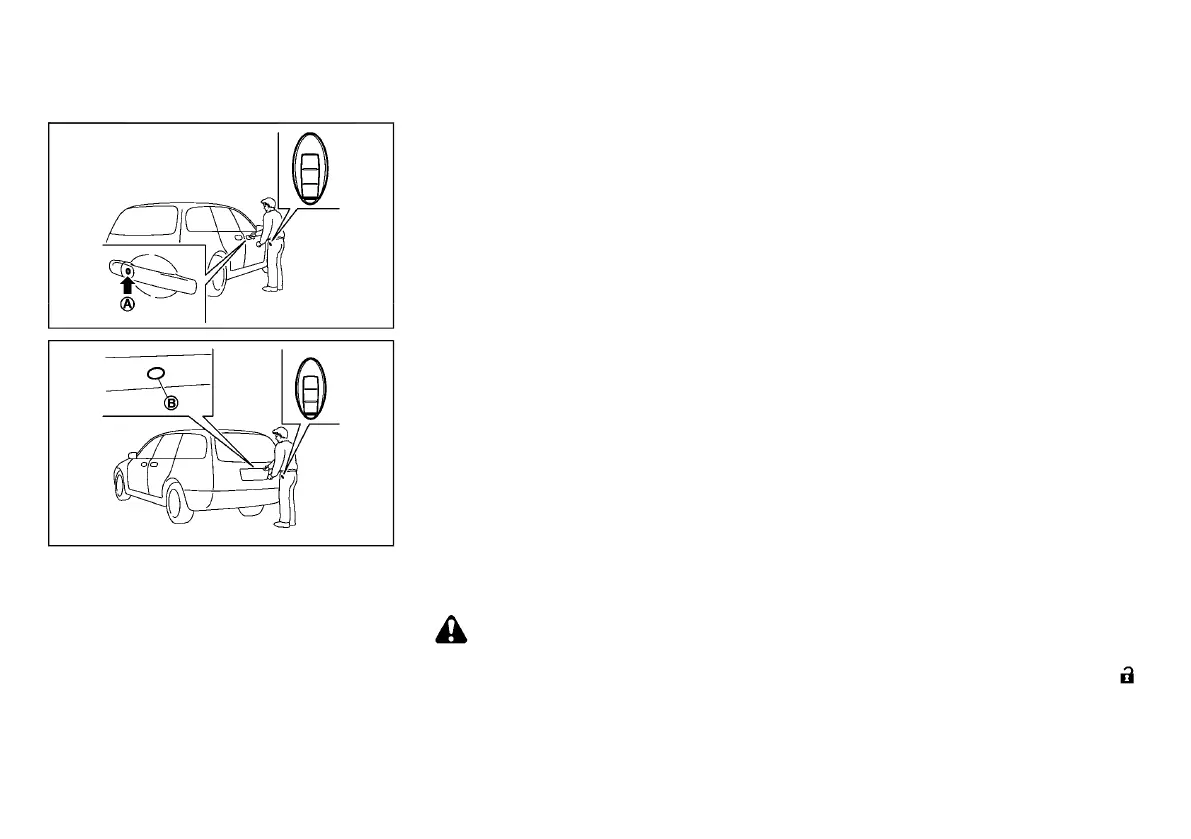
Request switch locations
GUID-763161FF-6081-4309-A33A-F9316D6D3082
JVP0125X
JVP0126X
When you carry the Intelligent Key with you, you can
lock or unlock all doors and the rear hatch by pushing
the door handle request switch (driver’s or front
passenger’s)
*
A
or rear hatch request switch
*
B
within the range of operation.
When you lock or unlock the doors and the rear hatch,
the hazard indicator will flash and the outside chime
will sound as a confirmation. For details, see “Hazard
indicator and outside chime operation” (P.3-10).
Locking doors and rear hatch
E12-A-120227-60182580-5440-44A1-88FA-8AFB2E2FB922
1. Push the ignition switch to the “OFF” position.
2. Carry the Intelligent Key with you.
3. Close all doors and the rear hatch.
4. Push the door handle request switch
*
A
(driver’s
or front passenger’s) or rear hatch request switch
*
B
.
5. All doors and the rear hatch will be locked.
6. Operate door handles to confirm that the doors
have been securely locked.
Lockout protection:
GUID-11F97BB9-9503-47D0-8BB9-62C812293875
To prevent the Intelligent Key from being accidentally
locked in the vehicle, lockout protection is equipped
with the Intelligent Key system.
. When the Intelligent Key is left in the vehicle and
you try to lock the door using the driver’s inside
lock knob after getting out of the vehicle, all the
doors will unlock automatically and a chime will
sound after the door is closed.
. When the Intelligent Key is left in the vehicle while
the driver’s door is opened and you try to lock the
door using the power door lock switch after
getting out of the vehicle, all the doors will unlock
automatically after the power door lock switch or
the driver’s inside lock knob is operated.
CAUTION:
The lockout protection may not function under
the following conditions:
. When the Intelligent Key is placed on top of
the instrument panel.
. When the Intelligent Key is placed inside of
the glove box.
. When the Intelligent Key is placed inside of
the door pockets.
. When the Intelligent Key is placed on or
under the luggage room area.
. When the Intelligent Key is placed inside or
near metallic materials.
The lockout protection may function when the
Intelligent Key is outside the vehicle but is too
close to the vehicle.
Unlocking doors and rear hatch
E12-A-120227-8A729769-E50A-470D-90F0-50D1ED3D9CE2
1. Carry the Intelligent Key with you.
2. Push the door handle request switch
*
A
or rear
hatch request switch
*
B
.
3. All doors and the rear hatch will be unlocked.
If a door handle is pulled while unlocking the doors,
that door may not be unlocked. Returning the door
handle to its original position will unlock the door. If the
door does not unlock, after returning the door handle,
push the door handle request switch to unlock the
door.
Automatic relock:
GUID-11F97BB9-9503-47D0-8BB9-62C812293875
All doors and the rear hatch will be locked auto-
matically unless one of the following operations is
performed within 30 seconds after pushing the request
switch while the doors are locked.
. Opening any doors.
. Pushing the ignition switch.
If during the preset time period the “UNLOCK”
button on the Intelligent Key is pushed, all doors and
the rear hatch will be locked automatically after the
next preset time.
Pre-driving checks and adjustments 3-7
Condition:


 To Next Page
 Loading...