To view detailed instructional videos regarding these and other features,
please go to www.nissanownersinfo.mobi.
19
BLUETOOTH
®
SYSTEM WITH NAVIGATION (if so equipped)
Send predefined or custom text messages* through your vehicle’s Bluetooth
®
system.
Receive texts through your vehicle’s Bluetooth
®
system that can be read to you.
Bluetooth
®
Streaming Audio allows you to use a compatible Bluetooth
®
cellular phone
to play audio files on your device. Your compatible cellular phone can be connected to
the vehicle’s audio system, allowing audio files to play through the vehicle’s speakers.
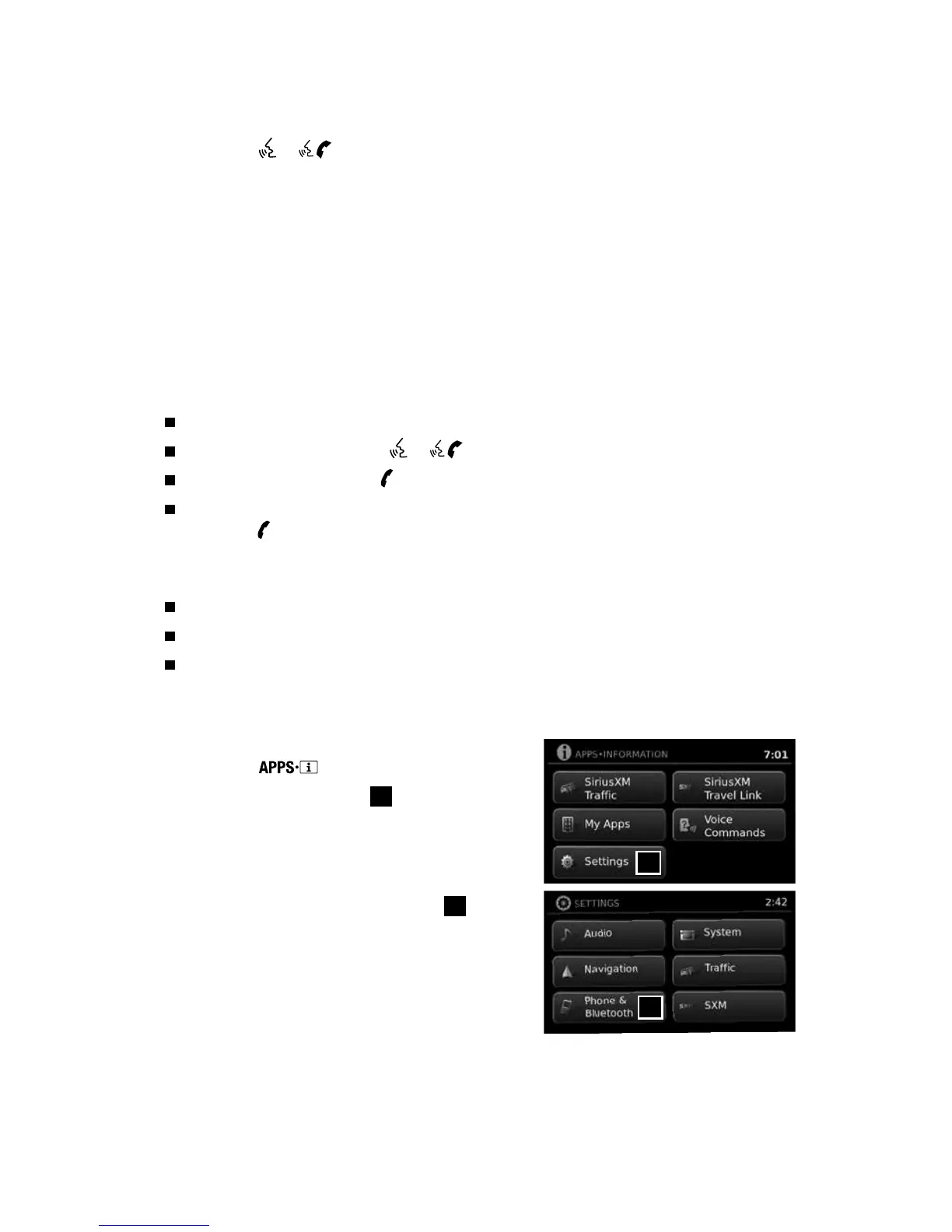
CONNECTING PROCEDURE
1. Press the
button on the control panel.
2. Select the “Settings” key
1
.
3. Select the “Phone & Bluetooth” key
2
.
1
2
MAKING A CALL BY PHONE NUMBER
1. Press the
or
button on the steering wheel. A tone will sound.
2. Say: “Call”. The system acknowledges the command and announces the next set of
available commands.
3. Say: “Phone Number”. The system acknowledges the command and announces the
next set of available commands.
4. Say the number you wish to call starting with the area code in single digit format.
5. When you have finished speaking the phone number, the system repeats it back and
announces the available commands.
6. Say: “Dial”. The system acknowledges the command and makes the call.
RECEIVING/ENDING A CALL
When you receive a phone call, a ring tone sounds through the audio system.
To accept the call, press the
or
button on the steering wheel.
To reject the call, press the
button on the steering wheel.
To hang-up the phone at the end of a call or to disconnect during call placement,
press the
button on the steering wheel.
*Laws in some jurisdictions may restrict the use of “Text-to-Speech”. Some of the applications and features, such as
social networking and texting, may also be restricted. Check local regulations for any requirements before using
these features.
1938147_16a_Versa_Note_QRG_051415.indd 19 5/14/15 1:49 PM



 To Next Page