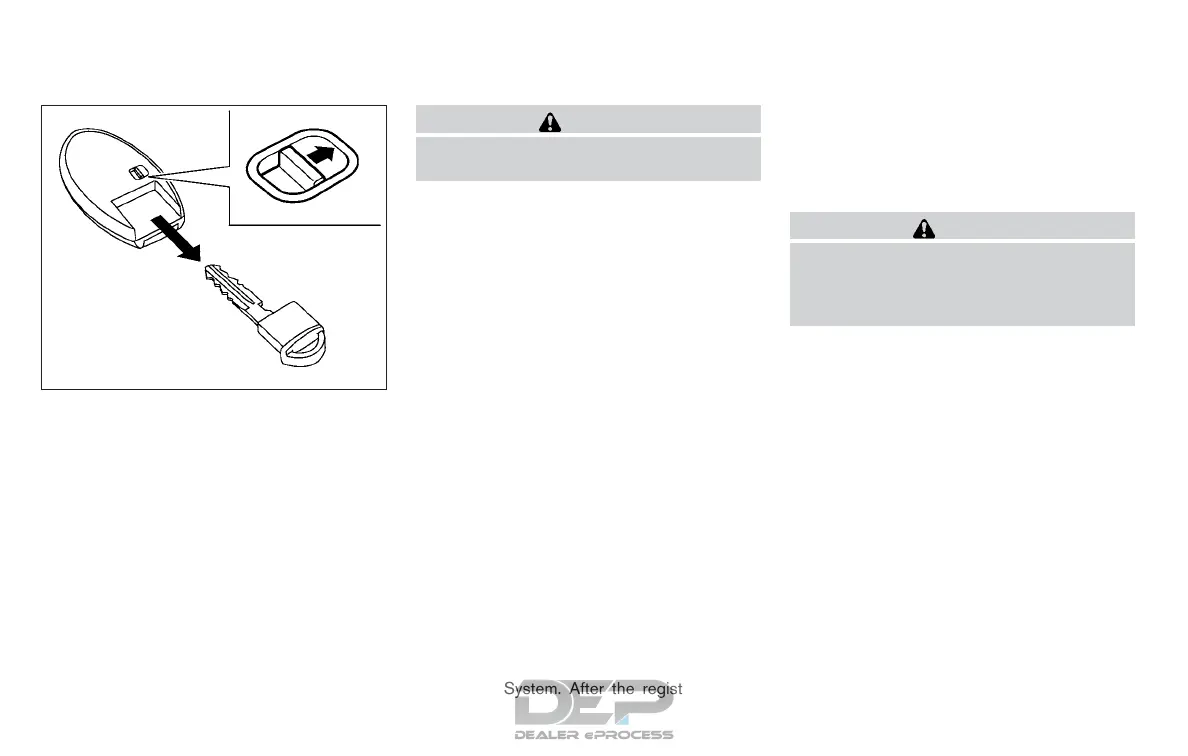
Mechanical key
The Intelligent Key contains the mechanical key,
which can be used in case of a discharged bat-
tery.
To remove the mechanical key, release the lock
knob on the back of the Intelligent Key.
To install the mechanical key, firmly insert it into
the Intelligent Key until the lock knob returns to
the lock position.
The mechanical key can be used for operation in
the same way as an ordinary key.
CAUTION
Always carry the mechanical key installed
in the Intelligent Key slot.
For additional information, refer to “Doors” in this
section and “Storage” in the “Instruments and
controls” section of this manual.
NISSAN VEHICLE IMMOBILIZER
SYSTEM KEYS (if so equipped)
You can only drive your vehicle using the keys
which are registered to the NISSAN Vehicle Im-
mobilizer System components in your vehicle.
A mechanical key can be used for all the locks.
Never leave the keys in the vehicle.
Additional or replacement keys:
If you still have a key, the key number is not
necessary when you need extra NISSAN Vehicle
Immobilizer System keys. Your existing key can
be duplicated without knowing the key number.
As many as four NISSAN Vehicle Immobilizer
System keys can be used with one vehicle. You
should bring all NISSAN Vehicle Immobilizer Sys-
tem keys that you have to a NISSAN dealer for
registration. This is because the registration pro-
cess will erase the memory of all key codes
previously registered into the NISSAN Vehicle
Immobilizer System. After the registration pro-
cess, these components will only recognize keys
coded into the NISSAN Vehicle Immobilizer Sys-
tem during registration. Any key that is not given
to the dealer at the time of registration will no
longer be able to start your vehicle.
CAUTION
Do not allow the immobilizer system key,
which contains an electrical transponder,
to come into contact with water or salt
water. This could affect system function.
SPA1951
3-4 Pre-driving checks and adjustments



 To Next Page